- 52 minutes 22 secondsYour UX Team Is Set Up for the Wrong Job
This month we look at why most in-house UX teams are organized around work that no longer arrives in the way it used to. Product owners, developers, and marketers are all producing design with AI tools long before anyone thinks to raise a ticket, and telling them to stop has quietly stopped working. We talk about what to fund instead, how to measure a team that is no longer the bottleneck, and where Marcus thinks Paul has gone too far. We also cover a new tool that gives a freelancer something close to a staff team, a new free email course, and the unexpected link between bees, a man with a bin on his head, and the power of consistently turning up.
App of the Month: Grok Bot
Grok Bot launched in early beta on 11 August 2026 from SpaceXAI and Cursor, and it is the first AI tool in a while that has genuinely surprised Paul. Rather than a single chat window, you spin up a set of agents with their own roles, so there is a chief operating officer to talk to day to day, plus a finance person, a marketer, a salesperson, and a designer. Each one has its own computer, they brief each other, and they keep working after you shut the laptop.
What makes it interesting is the complete absence of setup. There are no API keys to find and no MCP servers to wire up. You tell it which service you use, it pops up a button, you log in as you normally would, and it handles the rest. If there is no connector, it falls back to a browser. Paul asked it about a client message sitting in Slack, and it read the thread, gave him advice, created a task for Monday, added a note to the relevant meeting, and then offered to write the Slack message telling the developers what was happening.
For freelancers who lose hours to the admin they are least confident about, this is the closest thing yet to having colleagues. Marcus raised the obvious concerns about privacy and about becoming too reliant on output nobody checks, which is fair. Paul's answer to the second one is a quality control agent whose only job is to check everyone else's work, with the caveat that both can still be wrong.
The catch is the price. It runs at $200 a month, although that does include Cursor.
How the team is set up for the wrong job
Everybody is designing now
Paul used to insist that only proper UX people should do UX, and he is honest that a good part of that was protecting the job description rather than protecting the user. That position has become much harder to defend. Product owners come back from an hour with an AI tool holding a prototype and a flow that mostly hangs together. Developers generate interface options before the ticket has even been refined. Marketers build and test their own landing pages. Some of it is good, some of it is plausible rubbish, and all of it turns up before anyone thinks to involve design.
The complaint Paul hears most often from in-house teams is some version of how do we stop people doing this. In our experience you cannot stop them, because going around you is faster than waiting three months for a slot. The consequences are real, they are just delayed. Somebody ships a prototype that looked fine, and six months later the accessibility has failed quietly, the conversion rate is poor, and the product looks like it was built by three different companies. By then everyone has moved on and the rework never gets attributed to the decision that caused it.
Cutting the team is the expensive response
Meanwhile the money is going the other way. Headcount that leaves is not replaced, and the seat at the table turns into being asked to comment on decisions that have already been made. Cutting the team is the expensive response, because the work does not disappear, it just gets done worse and later.
What to fund instead
The organizations getting this right have moved design upstream, away from producing every screen. Fund the team to set the conditions instead of being the only route to a wireframe:
- A design system with real usage guidance, so a developer at 4pm can make a decent decision, or brief an AI to make one, without booking time with a designer.
- Playbooks for the work that keeps repeating. Landing pages are the obvious one, because marketers are already building them and they are not conversion experts, copywriters, or developers.
- A research repository that anyone can query, so the findings get used in the meeting six months after the readout instead of dying in a slide deck.
- Office hours, audits, and coaching as the service, with the hard political work still firmly on the books.
How you measure the team
How the team is measured has to change with it. If people are still judged on screens produced and tickets closed, the queue rebuilds itself inside a month, because nobody can afford to spend a week writing guidance that tanks their own numbers. Measure whether other people shipped something decent without design touching the file. Measure whether last quarter's research got referenced again. A quieter team is a sign the setup is working, not evidence that they are underemployed.
Where Marcus disagrees
Marcus pushed back, and the disagreement is worth listening to in full. He is happy with the developer querying a design system, and he has argued for years that a salesperson or researcher should not be drawing wireframes, because a wireframe is a series of design decisions dressed up as a diagram. His worry is that Paul is conceding ground that should be defended, particularly where the design is new rather than an application of existing rules. Paul's split is between taste and rules. Branding and anything close to art still needs a human leading, but interface and information design runs on accessibility standards, hierarchy, grids, and type scales, and those are rules a well-trained AI can follow. The important word is trained. Briefed cold, these tools produce something plausible and shallow. Given a design system, real guidance, and quality checks, the output gets good, and a designer spending fifteen minutes critiquing it is a better use of talent than two days pushing pixels in Figma.
There is a caveat for agencies, which Marcus is right about. At Headscape every project starts from scratch with a new brand, so there is more taste involved and more reason to keep a designer in the driving seat. In a bigger in-house setting, you decide the level of human check based on risk. That might be every piece of work going past a designer, or spot checks weighted toward people who are new to the tools.
Two things neither of us could answer
Two worries neither of us could answer. Plenty of designers love the craft of moving things around, and asking them to write documentation instead is not the job they signed up for, so this has to be handled with a lot more care than most organizations are known for. The bigger one is where the next generation comes from. If non-designers now do the work junior designers used to learn on, and the design knowledge in the tools stops being refreshed, the whole thing stagnates.
Where to start on Monday
If you want somewhere to start on Monday, ask whoever runs design what people keep coming to them for week after week, fund turning one of those into something the rest of the business can use without them, and stop routing every request through the person who still says yes.
If that conversation is one you are having with your own team, the UX design leadership workshop covers the same ground in more depth.
Read of the Month
Paul has released a free 14-lesson email course, Become the UX practitioner your organization actually needs. It makes the same argument as this episode with the detail we could not fit into an hour, delivered as short emails every couple of days, plus the full workshop slide deck as a PDF.
The written version of this month's topic is also up as Your UX team is set up for the wrong job.
Marcus' Joke
I just got a new job making plastic Draculas. There's only two of us on the assembly line, so I have to make every second count!
15 September 2026, 11:00 am - 50 minutes 56 secondsBrand Guidelines Are Ruining Your Website
Why print-first brand systems break online, and how to push back without demanding a full rebrand.
I've been grumbling about this one for years, because although almost everyone now meets a brand through a screen, we're still handed identities designed for brochures, business cards, and the occasional exhibition stand, and then told to make the website behave itself. So this month I have a proper rant about it and Marcus does his best to talk me down, which he largely manages. We also get into top task analysis, which is one of my favorite research techniques, and the free app I've built because I got fed up running it the hard way.
App of the Week
Top Task Analysis is a free app I've built to make top task analysis considerably less painful, mainly because I'd spent years running it with a spreadsheet, a survey tool, and a fair amount of swearing.
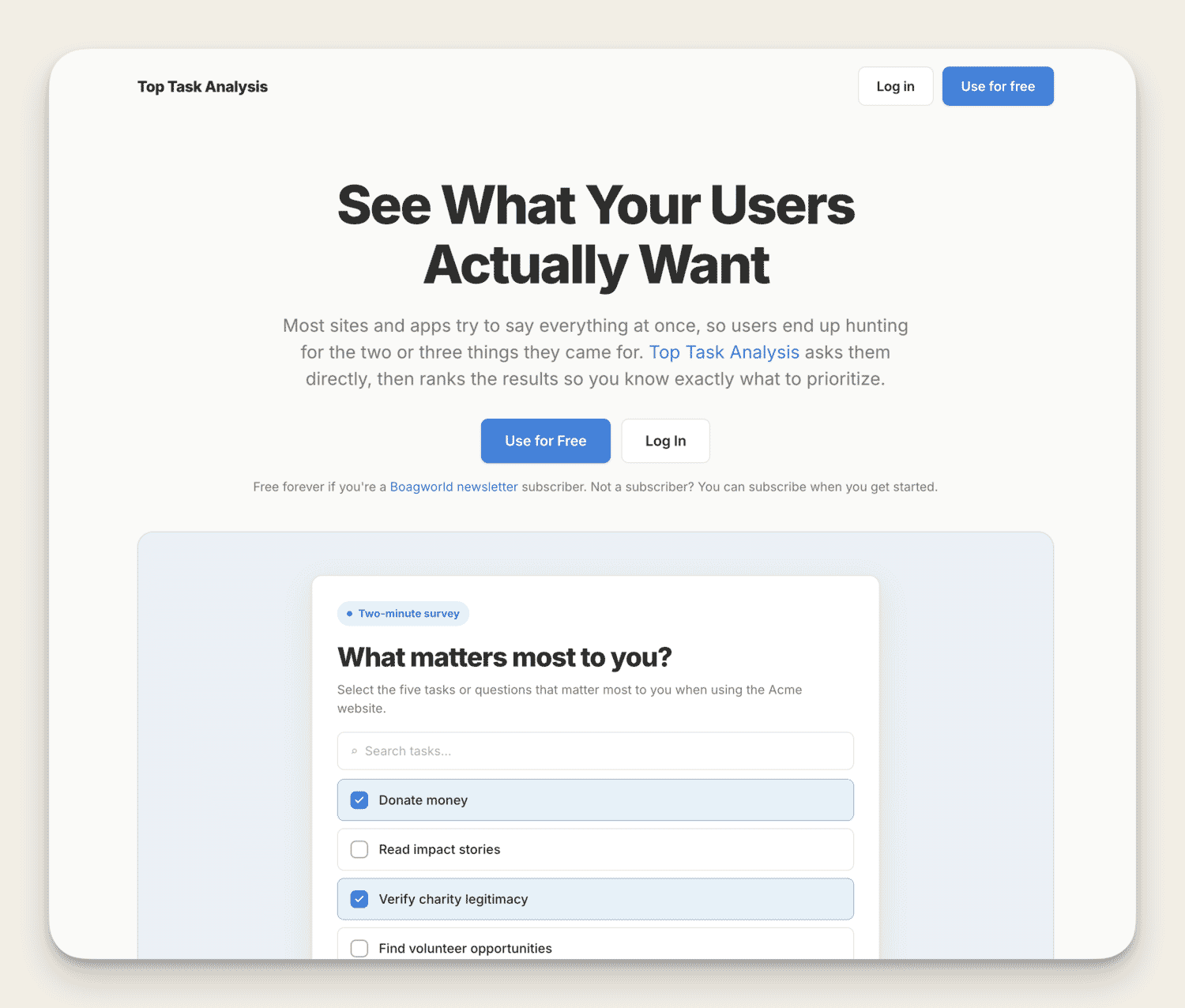
How top task analysis works
Top task analysis is a technique Gerry McGovern came up with, and it works a bit like a survey except that it stops people from being greedy, because an ordinary survey hands you a long list of everything your users say they'd quite like and no sense whatsoever of what they'd actually walk over hot coals for. This forces them to prioritize, so you end up knowing which small handful of things the majority genuinely care about. Gerry's classic example is the Microsoft Office knowledge base that kept answering more and more questions and kept watching its satisfaction score slide, because the answers people actually needed were buried under a hundred they didn't.
I use it for all sorts, from shaping information architecture and working out which objections are worth answering, through to prioritizing features and deciding what has earned its place on a dashboard. Roughly 80% of your users want about 20% of what's on your site, and this is how you find the 20%.
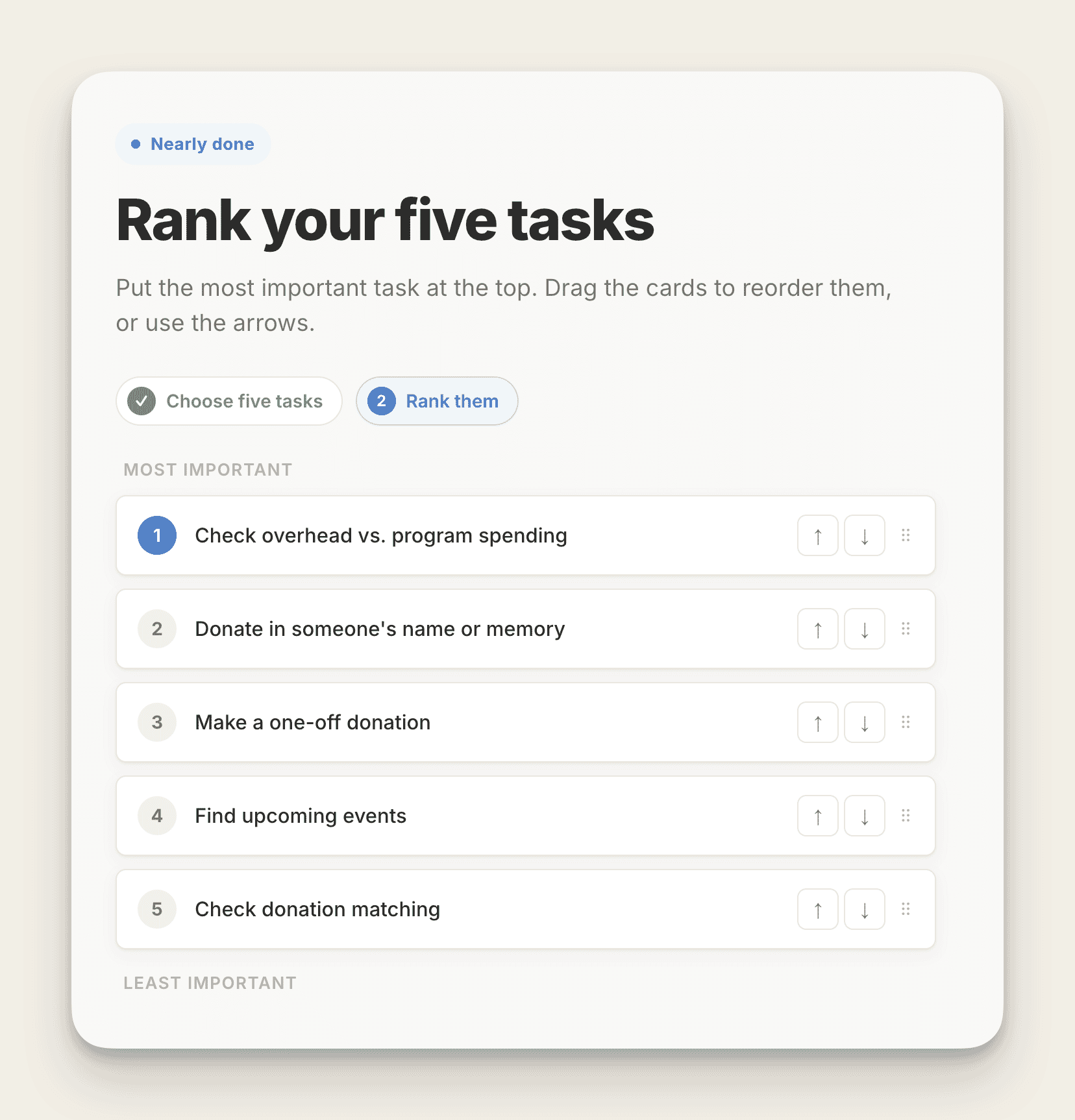
What the app does
The reason nobody runs it as often as they should is that it needs at least 2 rounds, one to gather the tasks and another to vote on them, so the app handles both in a single pass. You seed it with a starter list from AI, from the client, or from whichever stakeholder shouts loudest, and it genuinely doesn't matter if that list is a bit rubbish, because visitors can search it, pick the 5 tasks that matter most to them, and add anything that's missing, which then appears for everyone who arrives after them. A second screen asks them to put their 5 in order, and the back end lets you see the lot, merge the 14 different ways people phrase the same task, and tidy up anything unhelpful. And yes, there's a profanity filter, because I have met the internet before.
Marcus made the good point that you want a segmentation question alongside it so you can see top tasks broken down by audience, which is already in there, and he also dug up a hospital trust site we worked on years back where we dropped the top 8 tasks straight under the main navigation. They're still sitting there 8 years later, which either says something flattering about the technique or something less flattering about how often that site gets touched.
Give it a go
It's free, because I did think about charging for it and then couldn't be arsed, which is not the sharpest business decision I've ever made. Have a play and tell me what's broken.
- The app: Top Task Analysis
- The step-by-step guide: Top Task Analysis: A Free App And Step-by-Step Guide
- Feedback: [email protected]
When brand guidelines fight the web
Most people meet a brand through a screen these days, and yet the web is still treated as the place where you paste in whatever was designed for print. A branding agency mocks up a homepage that has never met a real sentence, the guidelines get signed off after 18 months and roughly all of somebody's political capital, and then some poor soul is handed the job of protecting it, at which point they'll defend an unreadable contrast ratio to the death because it's sitting on page 47 of the PDF. Consistency matters and I'm not arguing otherwise, but being consistently difficult to read isn't much of an achievement.
Marcus agreed with the general complaint and pointed out that Headscape has described itself as a brand interpreter for digital for something like 15 years now, for exactly this reason. He also told the story of a charity working with deafblind people whose shiny new sub-brand logo failed color contrast checks, and if I'd invented that example nobody would have believed me.
A brand should serve the organization and its audience, so the moment its rules make the website harder to use, those rules need to change.
What a brand actually is
A lot of the confusion comes from shrinking brand down to a logo, some colors, a typeface, and a photography style, when all of that is really just the clothes the organization turns up in. The brand itself is closer to a personality, made up of what the organization believes, how it talks, and how it treats people when nobody important is watching, and your copy and your customer service will say far more about that personality than a logo ever manages. Which means we have considerably more room to move online than the brand police like to let on.
Why print-first branding breaks online
Print gives a designer a beautifully controlled environment and the web gives them almost none of it, which is where most of the trouble starts. Somebody working on a poster knows the exact dimensions, the exact paper, and the exact ink, whereas online you're designing for a canvas you can't see, on screens that run from a cracked phone in bright sunlight to a 32 inch monitor with the brightness turned up to painful, at whatever zoom level somebody's eyesight demands that day. Pantone certainty becomes display roulette, where pale colors wash out, dark colors go muddy, and the elegant light gray text you signed off on a calibrated screen simply vanishes on a cheap laptop in a train carriage.
A poster sits still and a website refuses to
Then there's the small matter that a poster sits still and a website refuses to. Websites need hover states, focus indicators, error messages, forms, navigation that collapses gracefully, and buttons that look like buttons, and most traditional guidelines have nothing at all to say about any of it, because it never occurred to anyone in the room that it might come up. Add a few thousand combinations of real content, German translations that run half as long again, and pages that grow arms and legs over 3 years, and the handful of polished examples in the brand book stops being much use to anybody.
The familiar symptoms
The same problems keep turning up, and once you've noticed them you can't stop seeing them. There are the walls of capital letters that slow reading to a crawl, the brand color pairings with contrast so poor you can fail them by squinting, the decorative typefaces that turn to mush at small sizes, and the logos that only really work when they're the size of a bus, although responsive logos that simplify as they shrink are a lovely solution whenever anyone can be bothered to make one.
The typographic hierarchy problem
The one that genuinely baffles me, and I've run into it twice in recent months, is a brand book from an actual branding agency with no meaningful typographic hierarchy in it at all, as though headings were a passing fad we'd all agreed to ignore. Then come the layouts that can't cope with content nobody wrote in advance, the complete silence on containers and components, and the fact that there's frequently no contrasting color available for a call to action, because heaven forbid anybody should click on anything.
Where the cost lands
Any one of those on its own looks like a small compromise you can live with, but stack them up and the brand starts shoving people away from the website it was supposed to make them love. The cost lands on accessibility, on comprehension, on conversion, on trust, and eventually on the confidence of the designers themselves, who stop challenging the daft rules and start ignoring them when nobody's looking, which is how you end up with 9 versions of the brand in the wild and not one of them right.
What the attention test showed
I recently tested a brand-compliant homepage against a more flexible treatment using an AI attention prediction tool. The looser version came back with roughly 20% higher predicted clarity and focus, and predicted attention on the main call to action went up by more than 80%. These are modeled predictions rather than real conversion data, so please don't quote them as gospel, but they do give stakeholders something more interesting to argue about than personal taste. I was insufferable for the rest of the day.
Where Marcus and I disagree
I made the case for a digital-first approach, where you start with the personality and the principles rather than the letterhead, get UX, accessibility, content, and frontend people into the room while the decisions are still being made, design actual interface elements instead of stationery, and use the website as the place where the brand gets proven with real content on a small screen before it ever reaches print.
Marcus' counterargument
Marcus has tried that more than once and reckons it falls apart in practice, because running the digital interpretation alongside or ahead of the main branding project leaves nobody clearly in charge, and Headscape's opinion carries very little weight while the brand itself is still up in the air. He'd rather let the branding agency finish and get everything signed off, then arrive afterward with the client already warned that interpreting it for digital will mean changes, the typeface being the almost inevitable first casualty. He also pointed out that very few branding agencies build anything, which is a fair argument for keeping the two jobs apart.
Where we landed
I came round to that as the more practical position, with one condition attached, which is that whatever gets handed over has to be understood as a starting point for digital rather than a finished artifact that must never be questioned by anyone with a browser.
Consistency, not uniformity
The phrase I keep coming back to came from Neil Eastell at the National Trust years ago, and it's consistency, not uniformity. A brand system that works online is one that's clear about what has to stay fixed and honest about what's allowed to bend, so the logo keeps its essential form while picking up responsive versions, the core colors stay recognizable while gaining accessible digital variants, and the typographic personality survives a change of body typeface for the sake of download size or legibility, as long as nobody wanders off from a serif to a sans serif and hopes we won't spot it. Think of it as a jazz standard rather than a military march, where everyone is playing the same tune but there's room to improvise around it.
Questions worth asking
- Which parts of this identity genuinely express the personality, and which are just habits nobody has questioned?
- Was this rule written for screens, or copied across from print because it was already sitting in the document?
- What user or business outcome does it protect, if any?
- Does it still hold up on a small phone, at 200% zoom, in bright sunlight?
- What does that logo honestly look like as a favicon?
- How are you getting feedback on the brand from users rather than only from the board?
- When brand compliance and readability disagree, which one wins, and who gets to decide?
The practical takeaway
Whatever you do, don't open with a demand for a rebrand, because that conversation is over before it starts and you'll be the difficult one for the rest of the project. Find the specific places where the brand rules and basic usability are openly at war, fix the ones doing the most damage, measure what changes, and use that evidence to earn permission for the bigger conversation later on. And when you hit a wall, offer to test the brand-safe version against a looser one and let the numbers do the arguing for you, because a brand guardian will happily fight your opinion all afternoon but they'll rarely take on their own users.
A brand exists to build recognition and trust, so when protecting the rules starts eating away at both, we're guarding the wrong thing entirely. Or, to put it the way I put it on the show, be a bit more flexible about your bloody brand guidelines.
And because Marcus got his plug in twice, here is Headscape.
Marcus' Joke
When a TV antenna married another TV antenna, the service wasn't great, but the reception was amazing!
Marcus fluffed the delivery, which if anything improved it.
18 August 2026, 11:00 am - 1 hour 8 minutesDesigning Beyond the Chatbot
AI is changing far more than the speed at which designers produce work. In this episode, we talk with Josh Clark and Veronika Kindred about their book Sentient Design, how intelligent interfaces can respond to people in the moment, and why designers need to understand the character of AI before they can use it well.
---
Use the code SENTIENT-BOAG to get 20% off the book through Aug 31 at rosenfeldmedia.com.
---
Designing With AI as a Material
Josh and Veronika describe AI as a design material, much as paint, paper, code, or the web itself can be materials. Every material has a grain. It has qualities that make some things easy and other things awkward, unreliable, or downright foolish. Designers get better results when they understand those qualities rather than forcing the material to behave like something familiar.
Large language models are probabilistic. They can interpret intent, adapt tone, change formats, and produce many plausible variations, but they may also give different answers to the same question and present shaky information with alarming confidence. That makes them poor choices for some deterministic tasks, especially when a single correct answer matters. Asking one to count letters or provide an exact food-safety temperature without verification rather misses the point of what the material does well.
Designers need enough experience with AI to make an informed choice about when to use it and when to leave it alone. Refusing to engage with it leaves that decision to ignorance, which has rarely been a dependable design system, despite Paul's suspiciously successful career testing the theory!
The comparison with the early web runs throughout the conversation. Print designers initially approached websites with expectations shaped by paper, while the people who learned HTML and understood the new medium found different possibilities. AI creates a similar shift. Its rough edges can feel threatening, particularly when companies use it to cut costs or flatten skilled work into production, but those edges also point toward forms of interaction that were difficult or impossible before.
Moving Beyond the Chatbot
Chat has become the default AI interface, partly because our culture has spent decades imagining intelligent machines as talking machines. It can be useful because both the input and output remain open, but a blank text box also makes the user do a great deal of work. People must know what to ask, how to phrase it, and how to judge the resulting wall of text.
Sentient Design describes 4 broader postures for intelligent experiences:
- Tools accept an input and return a controlled, precise output. Shazam is a familiar example.
- Chat uses a turn-based exchange, although those turns can involve images, interface components, or shared artifacts rather than paragraphs of text.
- Agents receive a goal, plan and perform the work, then return with a result. They still need direction, oversight, and review.
- Copilots remain quietly present, notice context, and offer assistance when useful, much like spellcheck waiting behind the scenes.
These postures allow teams to choose an interaction that fits the task. A conversational box might suit exploration, while a focused tool is better for a clear transaction. An agent can handle delegated work, while a copilot can notice opportunities without demanding constant management.
Josh and Veronika also share examples of AI taking part inside an existing interface. Salesforce's Generative Canvas assembles relevant components using trusted customer and calendar data. Miro's sidekicks can enter a canvas with their own cursors, while Pointer participates in a Google Doc as an editor, using the collaboration patterns people already understand.
The interesting design question is how intelligence participates in an experience, not where to bolt on another chat window.
Defensive Design for Uncertain Systems
Trust becomes a design problem when systems are probabilistic. A generic disclaimer saying that AI can make mistakes does very little for someone deciding whether to believe a specific answer. Confidence scores often fare no better because most people have no useful way to interpret a claim such as “73% likely.”
Defensive design communicates uncertainty through language, interface, and context. A system can present an answer as a signal rather than an unquestionable fact, show nearby possibilities, reveal where information came from, and give the user sensible points for review or intervention.
Veronika describes “spaghetti scenarios,” borrowed from weather forecasting, where several possible paths are shown together. A search interface can do something similar by presenting adjacent questions and contrasting answers. This helps people see how wording, assumptions, and context affect the result.
Tone matters too. Human beings constantly signal confidence through phrasing, body language, and shared cultural habits. AI systems tend to speak with the polished certainty of Silicon Valley, even when the evidence underneath is wobbling like a pub table with one short leg. Designers need to shape that presentation for the domain, audience, and seriousness of the decision.
The pair argue that language models work well as the master of ceremonies for an experience. They can understand intent, coordinate with specialist systems, and present results in a useful format. Facts can come from trusted sources and deterministic tools, while AI handles interpretation and presentation.
AI should communicate uncertainty in a way people can act on, rather than hiding it behind confidence or a disclaimer.
From Doers to Directors
As AI becomes part of the product, designers move toward directing systems that make design decisions in the moment. The book describes them as creative directors for systems that design themselves in real time. They define the available components, language, behavior, constraints, and rules, then guide how the system adapts them to each person's context.
That shift can compress the handoffs between design, development, and product. Josh describes teams working in a common space, often a Git repository, where requirements, design guidance, and code sit closer together. AI can help each discipline contribute beyond its old boundaries, although the resulting overlap creates fresh questions about roles, careers, and management.
The conversation also acknowledges the uncomfortable part. Production work is already being absorbed, and some companies assume that one senior person can manage a fleet of agents instead of developing junior designers. That approach may remove the path by which the next generation gains judgment and becomes senior. It also mistakes design for assembly.
The stronger opportunity lies in behavior design, problem definition, research, creative direction, and the design of intelligent systems themselves. Designers can document why components exist, when to use them, how content should behave, and which outcomes matter. AI can then apply those rules while the designer improves the system through research and observation.
Paul shares an example from his conversion optimization work. Rather than creating a single landing-page template for many audiences and campaigns, he built a component system with detailed guidance covering placement, content, accessibility, funnel stage, and use. AI could assemble a suitable page within those constraints, while the human designer had more time for research and strategy. If you are facing similar questions about moving design beyond production, the free UX Strategy email course offers a useful next step.
The future of design depends on widening our view of the job, from producing screens to shaping behavior, systems, and decisions. That may be less comforting for anyone whose greatest joy is pushing pixels around in Figma, but it also brings design back to understanding problems and exploring possibilities.
Sentient Design
Sentient Design brings together the vocabulary, patterns, and examples emerging around intelligent interfaces. It covers 4 experience postures, 14 experience patterns, defensive design, adaptive interfaces, and the changing relationship between designers, developers, product teams, and AI.
You can find Josh Clark and Veronika Kindred at Big Medium.
Use the code SENTIENT-BOAG to get 20% off the book through Aug 31 at rosenfeldmedia.com.
Marcus' Jokes
Velcro. What a rip-off!
Exit signs. They're on the way out.
21 July 2026, 11:00 am - 52 minutes 7 secondsFrom Doer to Director, Getting Value From AI
This month we dig into whether Claude Design is any good, why so many people feel like AI is costing them time rather than saving it, and what it really means to stop being a doer and start being a director. Along the way we wander into the loss of craft, the ethics of AI, and a joke so niche it needs its own history lesson.
App of the Month
Claude Design is the tool that grabbed our attention this month. It builds out designs for you, and it is genuinely impressive. We used it to rebuild the website for a small UK charity that funds children's education in India, going from nothing to a finished static HTML site in around eight hours, with Claude Design handling the design and Claude Code doing the build. Beyond the standard twenty pounds a month subscription, it cost roughly fifty quid in extra credits, which for a small organization is a no-brainer.
Claude design and code together allowed Paul to create a fully working website in less than 8 hours.
It turns out it does more than websites. It builds presentations too, and exports them to PowerPoint or PDF for offline editing. We put together a fifty three slide deck for a client in about two hours, work that would normally have eaten the best part of four days.
Here is what we liked. It works with design systems, you can import one from Figma, you can make manual edits without burning tokens, and you can select elements visually to tweak them. The things that hold it back are that you can't export back to Figma, there's no easy publish button, and the usage allowance vanishes in what feels like five minutes flat. When you hit the wall it cheerfully suggests you try again on Sunday, which is no use when you're mid project and have already forgotten what you were doing.
One word of warning. If you don't guide it heavily, Claude Design has tells, like a recurring decorative bar under the hero section that serves no real purpose. Then again, every designer has a style you can spot, so we're not convinced that's the criticism people think it is.
From Doer to Director
A lot of people tell us AI isn't saving them time, it's costing them more of it. That confused us at first. How can a tool that turns four days of slide work into two hours possibly slow anyone down? The more we coached people through it, the clearer the answer became, and it has very little to do with the tools. It comes down to how organized you already are.
If you're not fundamentally efficient in how you work, and especially if you've never had to delegate to other people, AI exposes that straight away. The people struggling most are the ones who still want to be doers. They want to be in the code, pushing pixels in Figma, or typing every word themselves. To get real value from AI you have to shift from that doer mindset to a director one.
Be the conductor, not the violinist
It reminded us of the moment in the Steve Jobs biopic where Wozniak asks Jobs what he actually does, given that Woz writes the code and builds the hardware. Jobs answers that he conducts the orchestra. Woz is the finest violinist in the room, but someone has to bring all the players together. That conductor role is exactly the shift most of us need to make.
Running agents in parallel
A real example from this month. Working on a client presentation, we had three things running at once. Notion AI was drafting the outline in one window. Claude Design was studying the client's website to build a matching design system in another. A third agent was drafting video transcripts for a separate project entirely. Three workstreams all moving at the same time, where you would once have plodded through them one after another.
That is a genuinely hard skill to build. The people best placed for it are those with management experience, because they're used to handing work off and holding several threads in their head at once. If you've never worked that way, it can feel distressing, and there's even a name for where it leads, which our reader of the month gets into.
The micromanaging trap
There's a design leadership parallel too. Talented designers get promoted, then can't resist sneaking back into Figma to do the work themselves. The same thing happens with AI. The agent produces something perfectly good, but it isn't quite what was in your head, so you fiddle and fiddle and fiddle, burning the very time you were meant to save. The upside is that you can't hurt an AI's feelings, so just say "no, that's not it" and move on.
Get organized first
The fix is unglamorous. Get organized before the agents fully take over.
- Build the digital playbooks, SOPs and policies we keep banging on about, so the AI already knows how you work and gets it right first time.
- Keep your knowledge in one place it can reference, so you're not repeating yourself endlessly.
- Run a task system it can see, and learn markdown while you're at it. It takes ten minutes and AI loves it.
Tool or output, where's the joy?
We didn't agree on all of this. Marcus prefers using AI linearly and still enjoys the doing, the writing itself, rather than conducting an orchestra. That led us into deeper water about craft. Is the joy in the tool or in the output? Paul has found real satisfaction teaching AI to write in his voice while keeping the part he actually loves, communicating ideas with passion. Marcus worries that stripping away the craft, the genuine ability to play the instrument, costs us something real, and asks how the next generation of designers will learn without the junior grind.
We tested it against Monet, photography and the industrial revolution. Someone recently posted a supposedly fake Monet online and asked people to explain why it fell short of the real thing. They wrote whole essays about flow and composition, until it turned out to be a genuine Monet. So how much of our resistance is legitimate and how much is simply discomfort with change? We don't pretend to know. There are real problems with AI, the blatant disregard for intellectual property and the environmental cost chief among them, and they deserve people shouting about them. But the genie is out of the bottle, and as a species we've never once managed to put one back.
The one takeaway
The single takeaway. Start building your management habits now. Get organized, practice delegating, and learn to hold several threads at once, before that choice gets made for you.
Read of the Month
Marcus brought the counterweight to all that optimism. The article is Life with AI causing human brain 'fry', which introduces a term coined by the Boston Consulting Group.
"AI brain fry" is the mental exhaustion that comes from using or supervising AI tools past your cognitive limits, the sort caused by reviewing endless AI generated code, juggling multiple assistants, and rewriting lengthy prompts over and over.
It hits software developers hardest, since agents now churn out code faster than humans can review it for security flaws and overall coherence. Fittingly, the piece reached us via one of the developers at Headscape, who waved it about as proof that AI is a problem. We agree the problem is real. The article's advice is for company leaders to set clear limits on AI use to prevent burnout, though quite how they're meant to spot the issue without us telling them is another matter.
The catch is that a cynical manager will just point out that their whole day already feels like relentless context switching, so good luck getting much sympathy.
For a related read, Marcus also flagged AI didn't delete your database, you did, a sharp piece arguing that you should take responsibility for what you ship to production rather than blaming the AI when it all goes wrong.
Marcus' Joke
We end, as ever, with Marcus’ joke. This one needs a UK history lesson, so our apologies to anyone under forty.
I guessed orange, but it was chocolate. I guessed toffee, but it was peanut. I guessed strawberry, but it was coffee. I was wrong on so many Revels.
16 June 2026, 11:00 am - 51 minutes 14 secondsAI Can Fix Your Broken Research Repository
This week, Paul and Marcus dig into why traditional user research repositories fail almost everyone in an organization, and how AI is quietly changing the game. There's also an App of the Month pick that's a little too on-the-nose, some pointed Google bashing, and a sheep-based punchline.
AI-Powered User Research Repositories
The pattern in most organizations is depressingly familiar: user research gets done, a PowerPoint gets presented to stakeholders, everyone nods along or ignores it entirely, and then the research disappears. It might prompt some short-term action, but the knowledge evaporates. Nobody references it again six months later.
The traditional solution has been to build a research repository: a central place to store everything from interviews and surveys to usability tests and diary studies. The problem is that these repositories almost always become what Paul generously describes as "dumping grounds." Dense folder structures, difficult navigation, and search tools that require you to already know what you're looking for make them practically unusable for anyone outside the UX team. And who ends up using them? Other UX professionals, the people who already understand the research anyway. Everyone else ignores them.
AI changes this in three meaningful ways.
First, it makes the initial build far less painful. You can throw everything at it, PDFs, old PowerPoints, interview transcripts, survey exports, and AI will structure and organize that material into something coherent. What used to be a daunting, months-long project becomes manageable.
Second, it makes the repository accessible to people who aren't UX specialists. Instead of requiring a precise search query, a conversational interface lets anyone ask vague, natural questions. A product manager can ask "what do our users think about the checkout process?" and get a synthesized answer drawn from five different studies they never knew existed. That's a genuinely different kind of value.
Third, and this is the part Paul finds most compelling, it can identify gaps in your research. When someone asks the repository a question and there's no relevant research to draw on, a well-configured AI won't fabricate an answer. It flags the gap and notifies the UX team that this is an area worth investigating. Over time, the questions people ask become a demand-driven research roadmap, shaped by what people in the organization actually need to know rather than what the UX team assumes they need.
Marcus pushed back on the reliability question, which is fair given AI's well-documented habit of confidently inventing things. Paul's response: proper setup matters enormously. You instruct the AI explicitly not to fabricate, you add a quality gate that checks answers before they're returned, and you can even have it verify claims against source material. Even with pessimistic assumptions, say one in ten answers being wrong, that's still more useful than having nothing at all. And the failure mode is reassuring: if the AI can't find relevant research, it defaults to generic best practice rather than making something specific up about your users.
Paul then connected this to something he's discussed before: AI-powered virtual personas. The repository feeds the persona generation. AI analyzes the accumulated research and builds queryable personas from it. Unlike static persona documents that go stale almost immediately, these update as new research is added. And here's the detail Paul is clearly delighted by: put a QR code on your printed persona posters. Scan it, and you're now having a conversation with a virtual version of that persona. Marcus had recently written about the value of physical personas on walls as simple reminders of who you're designing for, and this neatly bridges the physical and digital.
The upshot: organizations that invest in an AI-powered research repository end up with something that prevents duplicate research, makes user insights accessible to everyone, identifies gaps in what's known, and gives the whole organization a quick way to gut-check decisions against actual user data. The reason more organizations aren't doing this, Paul notes with characteristic subtlety, is that UX teams are too small and too busy. "Hire me to do it" being the conclusion he arrived at, live on air.
App of the Month
Notion
Paul's pick this month is Notion, which he acknowledges he's almost certainly recommended before, given that he runs his entire business on it and describes its potential failure as roughly equivalent to his own. The recommendation here is specific though: Notion as the platform for building AI-powered user research repositories.
Two things make it well-suited for this. First, structural flexibility: you can organize a repository however your organization needs, and bring in almost any format of research artifact. Second, Notion has a powerful built-in AI agent that can reference, search, and synthesize across everything stored in it.
That said, Paul mentioned conversations with the RNLI, who use SharePoint and Copilot to achieve essentially the same thing. The principle works across platforms. Notion is Paul's preference, but he'd be the first to acknowledge the bias.
Interesting Reads
"Google is quietly rewriting headlines with AI in search results"
Dan at Headscape surfaced this one. Google has been quietly rewriting the titles of content in its search results, not a new practice, but one that has apparently accelerated significantly with the arrival of Gemini. The example from the article: a piece originally titled "I used the cheat on everything AI tool, and it didn't help me cheat on anything" was shortened to "cheat on everything AI tool." The meaning flips completely. Paul's view: this isn't really an AI problem so much as a "no human in the loop" problem. Remove human judgment from the process and you get outcomes like this.
"Testing suggests Google's AI overviews tell millions of lies per hour"
This one prompted a longer and more genuinely interesting conversation. The article references New York Times analysis suggesting Google's AI overviews are incorrect around 10% of the time. The illustrative example: AI Overview cited three sources to answer a question about when Bob Marley's home became a museum. Two of the sources didn't address the date at all. The third, Wikipedia, listed two contradictory years, and AI confidently picked the wrong one.
Paul and Marcus ended up in partial agreement. Paul's argument: we don't hold websites to a higher standard of accuracy than we hold AI, and the expectation of AI infallibility is inconsistent. The real issue is the word "confidently." AI states things with a certainty it hasn't earned, and the interface doesn't adequately signal uncertainty. Marcus's counter: AI summaries have effectively removed the click-through step, so an error now goes unchecked in a way a traditional search result didn't. They concluded it's largely a user interface problem, acknowledged that Google isn't going to remove the feature, and briefly proposed a BBC-funded public search engine before moving on.
Marcus' Joke
I'm entering the annual Give Helium to a Sheep contest again, and I'm a bit nervous. Last year the bar was very high.
19 May 2026, 11:00 am - 52 minutes 40 secondsAI Is Showing UI Designers the Door
So this month Marcus and I get into a slightly uncomfortable question. If AI can knock out decent interfaces from a text prompt, where does that leave the people whose day job is opening Figma and making screens look nice?
We start with Google Stitch, which has been getting a lot of attention lately. Then we zoom out into something I have become mildly obsessed with, which is building AI skills. Not prompt snippets, but reusable, documented processes that let you get consistent work out of AI without drowning it in context.
App of the Month
This month’s tool is Google Stitch (v2), Google’s AI UI generator. You describe what you want, it produces an interface, and you can do some light manual tweaking.
It is not a full replacement for Figma. The editing controls are basic. The bigger story is what it represents. We are now at the point where a decent, usable UI can be generated fast enough that the real value shifts from "can you draw the screens" to "can you judge what good looks like." That is where experience, and yes, taste, starts to matter.
If you want to compare approaches, I mentioned Figr again, which I still prefer for the quality of what it produces.
Are UI Designers Becoming Vinyl?
The question Stitch raises is not "can AI design interfaces". It clearly can. The question is what happens to the job market when "good enough" becomes cheap, fast, and widely available.
I found myself telling 2 different clients recently that they could probably skip hiring a UI designer. They had tight budgets, tight timelines, and already had solid brand guidelines or a design system. In those situations, I could push the work through AI, iterate it a bit, and get something perfectly serviceable.
That line of advice made me feel a bit grubby. Not because it was wrong for those clients, but because it hints at a bigger shift.
My worry is that UI design becomes like vinyl records. Most people will not need it. A small number will care deeply and pay for it. The middle ground shrinks.
Marcus made the important caveat here. Some designers will still be in demand because they bring something AI cannot easily fake. A distinctive visual style. Creative judgment. Brand thinking. The ability to make something feel like it came from a real point of view, not a model averaging the internet.
We also talked about where UI designers can expand their value, because "I make pretty screens" is not a great long-term career plan.
- Broaden into UX and problem solving. Look past the interface and into the business problem, user needs, and research.
- Own the stuff between screens. AI still tends to think screen by screen. Humans are better at flows, journeys, and the messy reality of how people actually get from A to B.
- Lean into information architecture. For websites especially, the structure and content model matter as much as the visual design.
We used a music analogy that will probably annoy some people, which makes it perfect. AI tools can generate "background" output that is fine for low-stakes use. They will not replace great musicians. But they will reduce the number of gigs available.
AI Skills As a Career Asset
After we finished terrifying UI designers, we moved on to something more useful. I think a lot of roles are going to need an AI toolkit. Not a handful of clever prompts, but a proper library of reusable skills.
When I say "AI skills," I mean documented processes that an AI can follow reliably. Think SOPs you can run repeatedly, not prompt snippets you copy and paste.
I now have around 60 skills in my library, and it is growing constantly. Outside of the Boagworld website, it might be the most valuable business asset I have.
The reason is consistency and context management. AI can produce terrible output when you dump too much information on it at once. Skills let you break work into focused chunks and chain them.
We talked about 3 levels of skills:
Company-level skills
Standard processes that keep things consistent. Proposals. Expense claims. Holiday booking. The sort of stuff that should not depend on one person remembering every step.
Team or discipline skills
For example, UX teams can create skills for personas, journey mapping, surveys, and top task analysis. That helps remove bottlenecks and lets colleagues do decent work without reinventing the wheel.
Individual skills
This is where it gets interesting for your career. These are the skills that capture how you do something, including all the weird little bits you have learned over the years.
A key point here is that the value is not only in having the skill. It is in creating it. Writing down a process forces you to surface assumptions and explain what "good" looks like.
We also got into AI agents. If you describe your skills well, an agent can chain them to complete bigger jobs. I gave a sales example where a meeting transcript can be turned into a CRM entry, follow-up tasks, company research, and a draft proposal with very little manual effort.
That is exciting. It is also mildly terrifying if you are attached to the idea of being indispensable.
For more on AI Skills read: Your AI Toolkit Is Your Competitive Edge
Read of the Month
I mentioned an article that helped me connect a few threads in my own work. UX, conversion rate optimization, and design leadership can look like 3 different things until you realize they all operate on the same system.
The piece is called "How CRO and UX Work Together to Increase Website Conversion".
It frames CRO and UX as two sides of the same coin. CRO asks, "Did they convert?" UX asks, "Was it easy and enjoyable?" I would add that UX also cares about what happens after conversion, because retention is often where the real money is.
The shared foundation is data. Analytics, event tracking, heat maps, session recordings. The same signals can tell you where people struggle and where the biggest conversion wins are likely to be.
It also reinforced something I believe strongly. CRO and UX should not sit in separate silos. Both work best when they cover the entire journey, not just one page at a time.
Marcus’ Joke
"I just purchased an original Van Gogh coffee table. I know it’s original because there’s a bit of veneer missing."
21 April 2026, 11:00 am - 1 hour 18 secondsWebsite Rebuilds, AI Tools, and UX in 2026
This month, Paul and Marcus get into a tool that has made Paul cancel his Figma subscription, walk through how Paul has completely changed the way he approaches website rebuilds thanks to AI, and round things off with the latest thinking from Nielsen Norman Group on where UX is heading in 2026.
App of the Week: figr.design
Paul has been road-testing AI design tools as part of a workshop he ran on AI and UI, and after going through dozens of them, one stood out: figr.design.
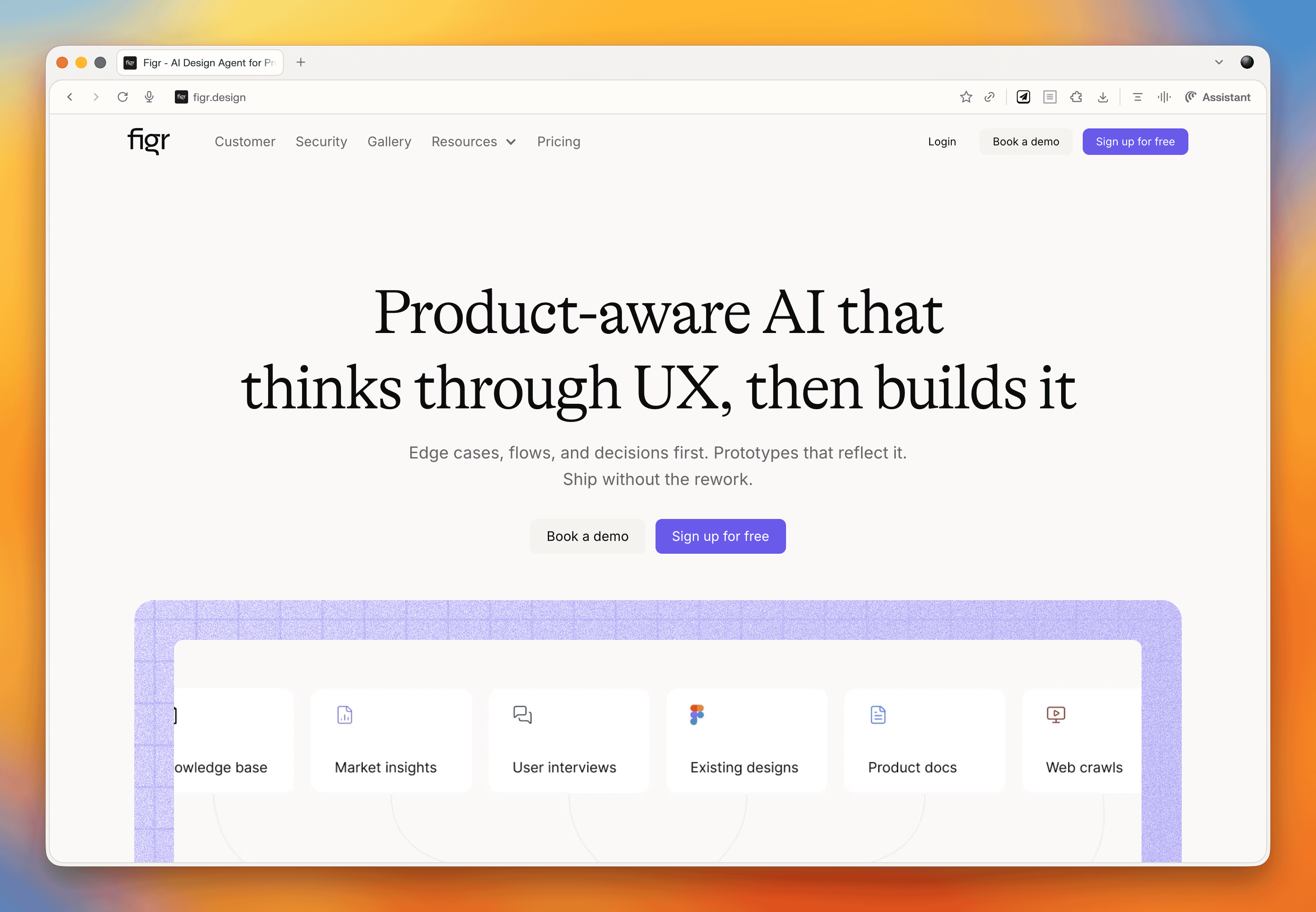
What makes it work where others fall short? A few things. It lets you feed in a significant amount of context upfront, things like style guides, design systems, and personas, which means the output is far more tailored than the generic average you often get from AI design tools. Iteration is also genuinely fast. You can queue up a whole list of changes and it processes them all in one go, rather than making you wait between each tweak.
The prototypes it produces are more realistic than what you would typically get out of Figma. Text fields you can actually type in, accordion states that open and close, button states, fully responsive layouts. Not exactly revolutionary in theory, but refreshingly functional in practice. Export to Figma is available when you need it.
The main limitation is that you cannot manually adjust elements yourself. Everything goes through the conversational interface. Paul has also been looking at a tool called Inspector, which runs locally and connects to the Claude API so you pay as you go rather than a flat monthly token allocation. It has been a bit fiddly to set up but worth keeping an eye on.
For anyone regularly using Figma for wireframing and prototyping, it is worth giving figr.design a proper look. The shift Paul describes, from hunching over Figma to leaning back and having a conversation with the tool, is a fairly good summary of where this kind of work is heading.
Rebuilding a Website in 2026
Paul has fundamentally changed how he approaches website rebuilds, and the shift is largely down to AI making a genuinely hard problem, getting good content onto a website, a lot easier.
The old problem
Website rebuilds have traditionally meant migrating existing content into a new design. Which sounds fine until you remember that most of that content was written by subject matter experts who know their field but have never thought about writing for the web.
The result is pages that lecture rather than help, that bury the things users actually want to know, and that rarely arrive on time, because the content phase is almost always where projects stall.
Why things are different now
AI has changed three things meaningfully.
- First, generating content is no longer the enormous manual effort it used to be.
- Second, doing the research that informs good content, finding out what users actually ask, worry about, and need, is much simpler with tools like Perplexity.
- Third, AI-powered search engines are pushing toward a more question-oriented approach to content anyway, which makes getting this right more important than it used to be.
How Paul works now
Here is the process Paul walks through for a rebuild project.
1. Online research
Using Perplexity, Paul researches the audience. For a well-known client, he'll ask specifically about them. For a smaller or niche client, he looks at the sector. He is looking for the questions people are asking, the tasks they are trying to complete, their objections, goals, and pain points. This takes about 10 minutes.
2. Personas
The research output goes into AI, which identifies patterns and segments it into a set of personas. A couple of hours of back and forth to get these right.
3. Company overview
Paul records his kickoff meeting with the client and points AI at the transcript. Out comes a clean summary of what the company does, its products and services, and how it talks about itself. An hour for the meeting, plus 10 minutes for the summary creation.
4. Top task analysis and information architecture
If time and budget allow, Paul runs a formal top task analysis, collecting and prioritizing the questions users most want answered. For card sorting, he uses UX Metrics. If there is no time for that, AI brainstorms the top tasks from the personas and company overview. Either way, those tasks get fed into an AI-generated information architecture.
5. Building out the IA
Paul builds the IA in the CMS or in Notion, assigning the relevant tasks and questions to each page. Stakeholders can see the structure and understand what each page is there to do before a word of copy is written.
6. Getting stakeholders to contribute
Rather than asking stakeholders to write content (a recipe for delays), Paul asks them to do two simpler things for each page: bullet-point answers to the questions assigned to that page, and any other talking points they want included. Bullets only. No pressure to write.
7. Writing the content with AI
This is where it all comes together. Paul sets up an AI project with four inputs:
- A web copywriting best practice guide covering readability, structure, and scanning
- A company-specific style guide built from existing brand materials
- The audience personas
- The company overview
For each page, he drops in the questions and stakeholder bullet points, and the AI drafts the content using all of that context. Paul recommends Claude for writing tasks. The result is copy that actually reflects the company's voice and addresses what users need, rather than generic filler.
8. Review and refinement
Stakeholders review the draft and leave comments, ideally directly in Notion where AI can read the page, take in the comments, and rewrite accordingly. One more pass by stakeholders and it is ready to go.
Paul has been using this approach on half a dozen projects and reckons you can work through a full site's worth of content in about a week (depending on size) once the setup is done. For clients, it is a service worth paying for because it takes the content burden off them while producing noticeably better results than migrating whatever was already there.
One thing Paul is careful to flag: this does not mean starting from absolute scratch every time. Old articles, compliance pages, event databases, templated content that just has to be there, all of that can still come across. The point is to treat migration as the exception rather than the default.
Read of the Week: State of UX 2026
The Nielsen Norman Group article Design Deeper to Differentiate confirmed, in Marcus's words, most of what Paul has been saying for the past year. Paul took this as further evidence he is always right!
A few of the key points from the article:
UX has stabilized after the 2023-24 downturn, but teams are leaner. UX practitioners are now expected to cover more ground and demonstrate business impact rather than just shipping deliverables.
AI fatigue has set in, both among designers tired of the "you're being replaced" narrative, and among users who have grown skeptical of AI features that add sparkle without actually improving anything. The article argues that trust is now the central design problem for AI-powered products, covering transparency, control, consistency, and what happens when things go wrong.
UI quality is becoming commoditized. If your value is primarily in making interfaces look good and work correctly, the ceiling on that work is dropping. Real differentiation lives in service design, content strategy, complete user flows, and the connective tissue that links everything together over time.
The hard-to-automate skills, taste, contextual understanding, critical thinking, and judgment, are where humans still add the most value. To thrive, the article suggests UX practitioners need to position themselves as strategic problem-solvers with a broad toolkit rather than deliverable-focused specialists doing what it calls "design theater."
Paul agreed with all of it. Marcus mostly agreed too, while noting that it must be genuinely difficult to be a UX specialist inside a large organization right now, particularly in teams that have cut so far back that one person is expected to cover the entire discipline. The answer, in Marcus's entirely unbiased view, is to hire Headscape!
Marcus' Joke
I stole a neck brace from the hospital. I feel kind of bad, but at least I can hold my head up high.
17 March 2026, 12:00 pm - 1 hour 18 secondsFrom Agency Work to Product Success
This episode we're joined by Stu Green, a product designer, agency founder, and serial app builder who's sold not one but two successful SaaS products.
We dig into the realities of building your own product versus running an agency, the role AI plays in modern product development, and whether the flood of AI-built apps is a threat or an opportunity for professionals.
Plus, we check out Bleet, an app that turns your meeting transcripts into social media content, and Paul shares how AI-powered personas are changing the way he approaches user research.
App of the Week: Bleet
You know you should be posting on LinkedIn. You've told yourself that every week for the past 6 months. But then you sit down, stare at the blank post box, and realize you have absolutely no idea what to write about. So you close the tab and promise yourself you'll do it tomorrow. You won't.
Bleet is an app built by Stu Green (and collaborator Nick) that solves this by mining the conversations you're already having. It takes your meeting recordings and transcripts, extracts the key topics using AI, and helps you turn them into social media posts. And the thing that sets it apart from just asking ChatGPT to write something for you is that it pulls your actual words and phrases from the conversation, piecing them together into posts that genuinely sound like you rather than generic AI slop.
How It Works
You connect your meeting recordings or transcripts (or even just speak a thought into the app), and Bleet will surface a list of topics you covered. From there, you pick the ones you want to post about and hit "create." You can dial in how much creative liberty the AI takes, from near-verbatim to lightly polished.
So you sit down for 10 minutes once a week, pick a handful of topics, schedule them up, and you're done. A single meeting can generate enough content for almost a week of daily posts.
What About Client Confidentiality?
The number one concern people raise is about sharing sensitive client information. Bleet strips out client names, specific people, and identifiable details. It focuses on the general topic and the ideas discussed, not the specifics of who said what in which meeting. And of course, you review everything before it goes anywhere, so if something feels too close to the bone, you just skip it or edit it.
Topic of the Week: Building Products vs. Running Agencies
Stu Green has lived both lives. He's run agencies, built products from scratch, and sold 2 SaaS businesses. So what's the difference between building for clients and building for yourself? Quite a lot, as it turns out.
Start by Solving Your Own Problem
Both of Stu's successful apps, a project management tool and HourStack (a time management app), started the same way: he needed something that didn't exist. The project management tool grew out of running his own consultancy. HourStack came from juggling small children and fragmented work hours, and wanting a way to visualize and stack little blocks of productive time.
If you're genuinely your own best customer, there's a good chance others like you exist. And if even 2 or 5 or 10 of them show up, you've got the start of something real.
The Myth of "I One-Shotted This"
AI has made it dramatically easier to build apps, but Stu is refreshingly honest about the gap between a demo and a product. Sure, he cloned entire apps in a single prompt and it looked great. But behind that impressive facade? Hours of iteration, hosting setup, video infrastructure, S3 servers, and a stack of decisions that require real product-building experience.
The people posting "I built this in one shot" on X are technically telling the truth, but they're showing you the Hollywood set, not the house behind the door. Getting from prototype to something you can actually charge money for still takes professional knowledge. You need to know what questions to ask, which answers are good, and when you're being led down a rabbit hole.
Two Tiers of AI Tools
Paul and Stu landed on a useful mental model: there are essentially 2 categories of AI building tools.
- Tools for everyone: Platforms like Lovable or Figma Make that let anyone create a basic app or prototype. Great for personal use, proof of concepts, and quick experiments.
- Tools for professionals: Things like Cursor and Claude Code that enhance a developer's ability to build production-quality software faster and better, but still require real expertise to use well.
Think of it like desktop publishing in the '90s. When it arrived, everyone panicked that graphic designers were finished. Instead, regular people made terrible flyers with Comic Sans, and the professionals used the same tools to produce better work, faster. AI-built apps are following the same pattern.
The 3-Stage Development Model
Paul offered a framework for thinking about where AI fits in the build process:
- Prototype and proof of concept: Anyone can do this with AI tools. Great for validating ideas quickly and cheaply.
- The production build: This still needs a professional. Security, scalability, accessibility, solid architecture: these are non-negotiable if people are paying to use your product.
- Post-launch iteration: Once a professional has laid a strong foundation, less technical people can step back in and make tweaks and improvements with AI assistance, because they're working within a well-built structure.
A Revenue-Sharing Model Worth Considering
Stu floated an interesting agency model: instead of charging a client the full upfront cost to build their app, what if you took partial ownership? The client pays a smaller retainer and upfront fee, you build and host the product, and you share in the revenue. If the app takes off, everyone wins. If it doesn't, your exposure is limited.
The key is picking partners carefully. They need to bring the marketing and audience side of the equation, because your job is the infrastructure and development. It's a model that silverorange, a Canadian agency, used successfully with e-commerce clients years ago, and it still holds up.
When to Sell
Stu sold both his apps when they hit what he calls "the plateau," that point where growth flattens and your churn rate starts catching up with new customer acquisition. At that stage, you either invest heavily to push through (hiring, scaling infrastructure, customer success teams) or you sell to someone who wants a product with proven recurring revenue.
For Stu, as a creative who'd rather build new things than manage database consultants and customer support, selling was the obvious choice. He used brokers both times, people who handle the paperwork, the letter of intent, and protect both sides of the deal. They take a cut, but they also sent chocolates, so it all evens out.
Finding the Right Ideas
With everyone building apps now, how do you pick the ones worth pursuing? Stu's answer is to not go it alone. Find partners who are excited enough about the idea to invest their time and audience. If you pitch an idea and nobody wants in, that's useful information. If someone does, you've got both validation and a distribution channel on day one.
He tested this with an AI running coach concept, reaching out to local running coaches in Jacksonville. When they responded with polite indifference, he moved on rather than sinking months into a product nobody was asking for.
Read of the Week: AI-Powered Personas
Paul shared his latest obsession: using AI to breathe new life into user personas. He's written 2 articles for Smashing Magazine that walk through the process:
- Functional Personas With AI: A Lean, Practical Workflow: How to build genuinely useful personas that focus on what people are trying to do, not just demographic data.
- AI In UX: Achieve More With Less: Broader lessons from using AI across user research, design, development, and content creation.
The approach: take all your research (surveys, interviews, call logs, analytics) plus deep online research from tools like Perplexity, feed it into AI, and generate highly detailed personas, far more detailed than the traditional single-page variety. Then load those personas into a project in ChatGPT, Claude, or Gemini, with instructions to answer questions from the persona's perspective.
The result is something you can consult in every meeting, on every decision. A product team can upload photos of next season's lineup and ask "what would our audience think?" A web team can test wireframes against the personas. Real user research still matters, of course, but this approach makes research-informed thinking available at a frequency and scale that traditional methods never could.
Marcus's Joke
"I tried to steal spaghetti from the shop, but the female guard saw me and I couldn't get pasta."
Courtesy of comedian Masai Graham. And yes, it's exactly as bad as you think.
17 February 2026, 12:00 pm - 51 minutes 30 secondsThe UX Reckoning: What 2026 Holds for Our Industry
In this episode, we kick off 2026 with a candid look at where the UX industry stands and where it's heading. We dig into a thought-provoking article from Nielsen Norman Group, share our hopes (and fears) for the year ahead, and explore a fantastic design pattern catalog focused on building user trust. Plus, we discuss why generalists might just be the unicorns the industry needs right now.
Topic of the Week: Preparing for 2026 and the UX Reckoning
We spent a good chunk of this episode discussing an article from the Nielsen Norman Group that, while technically published in early 2025, remains just as relevant today. Written by Kate Morin, Sarah Gibbons, and others at NNGroup, it tackles the challenges facing our industry head-on.
UX Is Back on the Chopping Block
Let's not sugarcoat it. It's been a tough time for UX professionals. Layoffs have hit hard, particularly in the US, and there's a palpable sense of doom and gloom floating around LinkedIn and other professional spaces. We've seen this before, though. We set up Headscape right in the middle of the dot-com bust, after being laid off ourselves. It wasn't fun, but times like these have a way of separating the wheat from the chaff.
Economic downturns tend to clear out people who jumped into UX because they saw easy opportunities, leaving behind those with genuine understanding and passion for the work. And despite all the negativity online, the World Economic Forum actually ranked UX design as one of the 8th fastest-growing industries. So the discipline itself isn't dying. There's just been a mismatch between the number of people entering the field and the reality of what the market can absorb.
The Rebranding Debate Is a Red Herring
Some people are suggesting we rebrand UX to "product design" or "experience design" to solve our problems. We don't think that's the answer. The word "design" does carry some baggage. In many business minds, it's seen as a luxury rather than a business-critical function. So when budgets get tight, "design" gets cut while "conversion optimization" and "customer retention" survive. That's a perception problem, not a naming problem.
The real issue is that there are too many low-quality UX practitioners who've been churned out through bootcamps. They've been taught a process to follow, and they follow it come what may. That's not their fault; they were taught that way. But six months of bootcamp doesn't prepare you for the messy, contextual reality of actual UX work.
The AI Reckoning
The negativity around AI on LinkedIn has been phenomenal lately. There's anger about "AI slop" and a general feeling that it's no good for anything. Paul posted about using AI to help create personas and do online research, and got absolutely slated for it.
AI is just a tool. Like any tool, if you use it badly, you get bad results. If you use it well, it can be genuinely helpful. The good news is that we're finally moving past the "AI for AI's sake" phase. We're starting to see thoughtful integration of AI into products and services, AI that actually solves real user needs.
Every technology goes through the same cycle. Remember video recorders? First, we were just amazed the technology worked at all. Big analog buttons, you started recording and stopped recording, and that was it. Then manufacturers added more and more features until the things became unusable with their tiny buttons and complicated preset systems. Then someone invented a code you could enter from the Radio Times to set recording times automatically. And finally, Sky came along with "press a button and it records." AI is going through that exact same evolution right now.
Shallow UX Is Suffering (and That's Okay)
Templates, processes, production-line UX: that stuff is really struggling, and it will continue to struggle. AI can do that now. You're not going to make money or build a career by blindly following the double diamond and churning out deliverables.
What you need going forward are distinctly human skills: critical thinking, taste, knowing whether something is heading in the right direction, and navigating messy organizational dynamics. Those are the skills that matter. Soft skills like relationship building, facilitation, and empathy are going to be far more valuable than whether you can use Figma.
Stop Worshipping Templates and Processes
UX is messy. You can't box it up the same way on every project. Templates and checklists are great starting points, but they're not a substitute for thinking. Context is everything.
There's no such thing as best practice. When someone from Google or Facebook says you need a 6-week discovery phase with facilitated usability testing of at least 6 people, and sure, that probably worked great for their situation, with their team, their product, and their stakeholders. But it doesn't mean it's right for your startup or your client with a third of the budget and massive internal politics.
If you've been taught a linear process, shift your mindset. Don't have a process. Have a toolkit of techniques you use as and when appropriate. You don't always need a discovery phase; sometimes a quick phone call is enough. You don't always need journey mapping; sometimes that's just not appropriate.
Don't Lose the Human Connection
Be careful that all these AI-powered conveniences don't cost you your connection with actual users. It's tempting to just run surveys, do unfacilitated remote testing, or let AI do online research. But you don't build real empathy that way.
When you sit down to write copy or design an interface, you want to be able to picture the person in your head. You want to feel who they are, what they'd say, what they'd struggle with. The more levels of abstraction between you and your users, the harder that becomes. Even if it's just talking to one or two customers, make sure you're seeing them as real people.
Become a Unicorn (a.k.a. Generalist)
For years, we've been told to specialize. But now? We need to become more comfortable wearing multiple hats. You might be doing wireframing, user research, strategy work, and training, all in the same week. You might need to understand adjacent fields like marketing, business strategy, data modeling, or product management.
AI can help extend your capabilities. Maybe you know a bit about accessibility or SEO, but not enough to do a full audit. With AI's help, you can now be better in those areas. Still not as good as a specialist, but better than you would have been alone.
Stop focusing so much on outputs (wireframes, reports) and start focusing on outcomes. Elevate your thinking from tactical to strategic.
If you want to dig deeper into this, check out Paul's free email course. It's 30+ emails on thinking more strategically and holistically about UX.
Read of the Week: Design Patterns Catalog by Projects by If
We stumbled across a brilliant resource from an agency called IF. They've created a design patterns catalog with a particular emphasis on building trust through transparency, user control, and thoughtful approaches to consent and data sharing.
This is increasingly important, especially as AI becomes more prevalent. It's not about slapping a testimonial on a page and calling it done. It's about baking trust into the experience itself. The catalog is beautifully illustrated and well-explained, making it a great scannable reference.
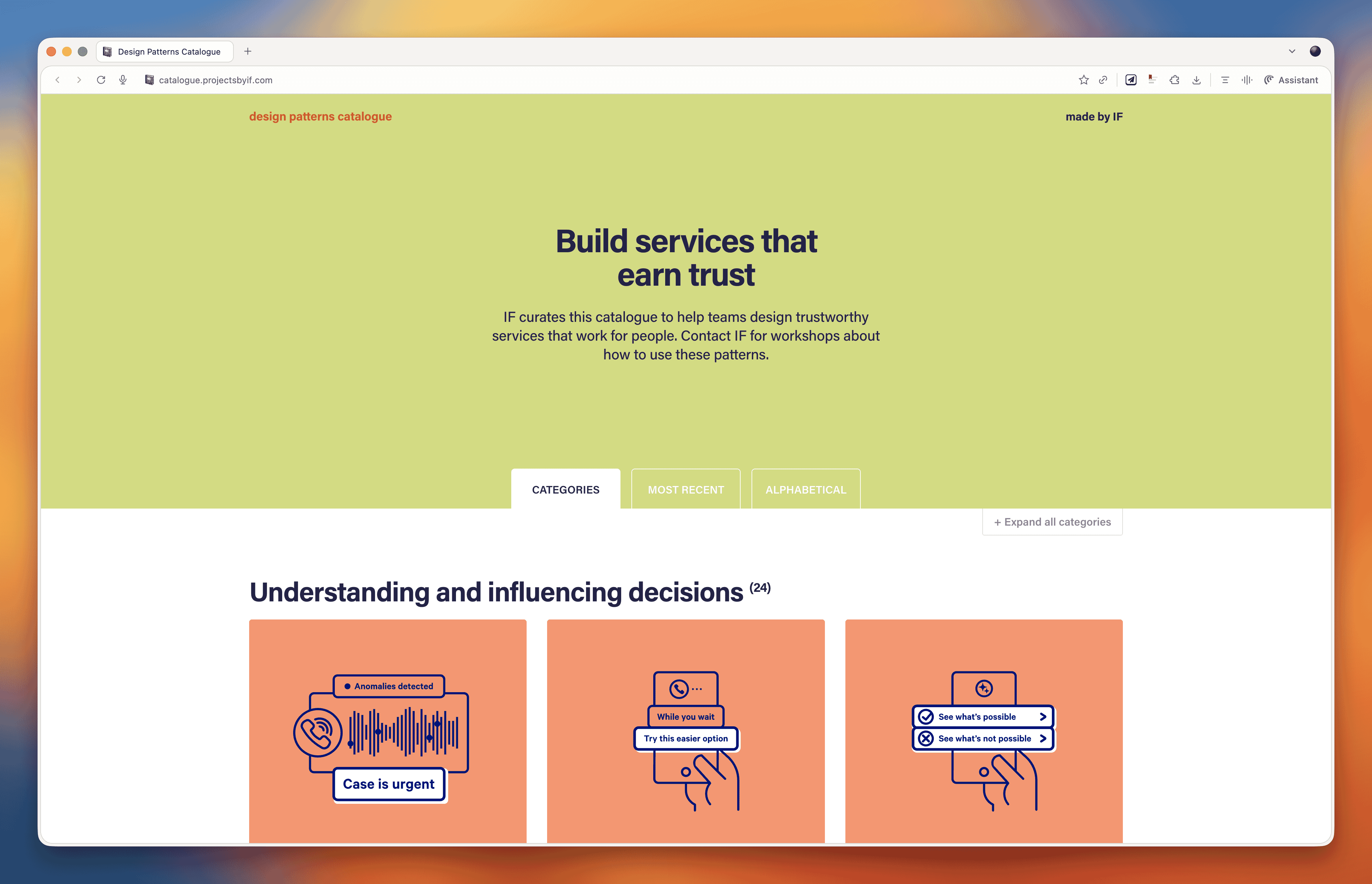
Paul found this while working on Bleet, a tool that automatically extracts advice from your recorded meetings and turns it into social media content. The trust challenge there is obvious: you're uploading client meetings with confidential information, so finding patterns for building that trust was essential.
Marcus's Joke
"I dropped a tub of margarine on my foot two weeks ago. I can't believe it's not better."
13 January 2026, 12:00 pm - 1 hour 3 minutesSurviving Crisis: Lessons from Higher Ed's Financial Storm
In this episode, we welcome back Andrew Millar from the University of Dundee to discuss the current state of higher education, vibe coding platforms for non-developers, and the importance of community-driven conferences like Scottish Web Folk.
App of the Week: Bolt.new
This week we're looking at Bolt.new, a vibe coding platform designed specifically for non-developers. Unlike tools like Cursor that are built for developers to pair program with AI, Bolt is aimed at people like marketers, designers, and small business owners who want to create functional applications without ever touching code.
Paul has been using Bolt to build practical tools for his own business, including a custom top task analysis app, WordPress plugins, JavaScript extensions, and CSS animations. The platform handles everything from the database to publishing and hosting, making it genuinely accessible for non-technical users.
However, we'd caution against treating these tools as production-ready for enterprise use. They're excellent for prototyping, internal tools, and small-scale applications, but they likely won't pass rigorous quality control in larger organizations. Think of them like desktop publishing was in the early days. They democratize creation but don't eliminate the need for professional expertise.
For production-ready code, the real value comes when developers use AI pair programming tools where they can review, understand, and quality-check the output. The future likely involves professionals using these tools to increase productivity rather than replacing expertise entirely.
Topic of the Week: The State of Higher Education and Digital Transformation
Andrew Millar, who runs the digital team at Dundee University, joins us to paint an honest picture of the current higher education landscape. It's not pretty, but his candid insights offer valuable lessons for anyone navigating organizational crisis, whether in universities or elsewhere.
The Perfect Storm Facing Universities
Higher education has always claimed poverty, but the structural problems have become impossible to ignore. Universities face two fundamental financial challenges: funding per student hasn't kept pace with inflation over the past decade, and research grants typically only cover around 80% of actual costs, leaving institutions to make up the difference.
International students became the solution to plug this gap. They could be charged higher fees and effectively cross-subsidized teaching for domestic students and research activities. This worked until a perfect storm hit: COVID disruptions, international conflicts, hostile government rhetoric toward international students, and for Dundee specifically, the Nigerian economy's collapse, which dramatically reduced one of their key international markets.
Dundee found themselves with a 30 million pound deficit. Within a year, the principal resigned, the entire executive changed, the Scottish government stepped in with emergency funding, and 500 staff members have left from a workforce of around 3,000.
The Three Phases of Crisis Management
Andrew outlined three distinct phases organizations go through during financial crisis, and his framework offers practical guidance for anyone facing similar situations.
Phase 1: Cut, Cut, Cut
When crisis hits, budgets get slashed, often multiple times. Andrew recommends categorizing everything into three buckets: what's absolutely critical to keep the lights on, what will hurt but won't cause lasting harm, and what's easy to eliminate. This is actually an opportunity to clear out legacy systems and processes that nobody uses but somehow persist.
The challenge is that during this phase, people aren't open to change or new ways of working. They just want to see the existing stuff cut. Don't waste energy trying to introduce innovations here. Focus on strategic pruning.
Phase 2: The Great Spaghetti Flying Contest
This is where everyone becomes an expert on how to solve the crisis. Phrases like "we should at least try it" and "isn't it good to test ideas?" fly around constantly. The problem is that these are the exact phrases digital teams have been using for years to encourage experimentation, now thrown back at them by people with competing priorities.
Governance structures become critical here. You can clarify requests (ensuring they're truly worth pursuing), compromise on scope, or clog them up in committees until priorities become clearer. When your escalation paths have collapsed, as they did at Dundee when leadership departed, you're left justifying decisions without backup.
The key insight: never say "computer says no" via email. Have conversations. Explain your reasoning. When people understand the constraints, they typically accept them. Email refusals just get escalated to whoever shouts loudest.
Phase 3: The Big Squeeze
With less money, fewer people, less institutional knowledge, and no clear strategy, this phase is when things get really difficult. But paradoxically, it's also when people become more open to change. They've accepted that old ways aren't working and are more receptive to credible, evidence-based proposals for doing things differently.
Digital Team Transformation and the Hub-and-Spoke Model
Andrew's team has evolved significantly since their original digital transformation work. They reduced the number of people managing the corporate website from 350 to about 20 while maintaining quality. Now they're moving toward a hub-and-spoke model, with centralized governance but distributed execution.
The ideal version of this model, which IBM pioneered, has people embedded in individual departments but reporting into the central digital function. This creates healthy tension, since they need to keep their central manager happy while also serving their local colleagues. It maintains standards while building subject matter expertise across the organization.
One emerging priority is what Andrew calls "generative engine optimization," ensuring content is structured so AI tools can accurately surface and represent it. As more users get information through AI intermediaries without ever visiting your website, getting this right becomes critical.
The Value of Community: Scottish Web Folk
The conference that inspired this episode, Scottish Web Folk, emerged partly out of necessity. When travel budgets got cut, Dundee created their own event. It's now grown to over 150 attendees with strong sponsor support, all while maintaining its community-first ethos.
The conference bans sales pitches from sponsors, limiting them to 30 seconds of self-promotion. Instead, it emphasizes knowledge sharing between suppliers and institutions. This approach keeps sponsors coming back because they recognize that embedding themselves in the community pays long-term dividends.
For any digital team, hosting events like this builds internal credibility and external relationships simultaneously. It positions you as thought leaders within your organization while creating the networks that sustain careers and enable collaboration across institutional boundaries.
Marcus's Joke
"I started dating a zookeeper, but it turned out she was a cheetah."
That's a wrap for this episode. See you in the new year!
23 December 2025, 12:00 pm - 58 minutes 4 secondsE-commerce UX Secrets: What 200,000 Hours of Research Reveals About Conversion
If you run an e-commerce site or work on digital products, this conversation is packed with research-backed insights that could transform your conversion rates.
Apps of the Week
Before we get into our main discussion, we want to highlight a couple of tools that caught our attention recently.
UX-Ray 2.0
We talked about this last week, but it deserves another mention. UX-Ray from Baymard Institute is an extraordinary tool built on 150,000 hours (soon to be 200,000 hours) of e-commerce research. You can scan your site or a competitor's URL, and it analyzes it against Baymard's research database, providing specific recommendations for improvement.
What makes UX-Ray remarkable is its accuracy. Baymard spent almost $100,000 just setting up a test structure with manually conducted UX audits of 50 different e-commerce sites across nearly 500 UX parameters. They then compared these line by line to how UX-Ray performed, achieving a 95% accuracy rate when compared to human experts. That accuracy is crucial because if a third of your recommendations are actually harmful to conversions, you end up wasting more time weeding those out than you saved.
Currently, UX-Ray assesses 40 different UX characteristics. They could assess 80 parameters if they dropped the accuracy to 70%, but they chose quality over quantity. Each recommendation links back to detailed guides explaining the research behind the suggestion.
For anyone working in e-commerce, particularly if you're trying to compete with larger players, this tool is worth exploring. There's also a free Baymard Figma plugin that lets you annotate your designs with research-backed insights, which is brilliant for justifying design decisions to stakeholders.
Snap
We also came across Snap this week, which offers AI-driven nonfacilitated testing. The tool claims to use AI personas that go around your site completing tasks and speaking out loud, mimicking user behavior.
These kinds of tools do our heads in a bit. On one hand, we're incredibly nervous about them because they could just be making things up. There's also the concern that they remove us from interacting with real users, and you don't build empathy with an AI persona the way you do with real people. But on the other hand, the pragmatic part of us recognizes that many organizations never get to do testing because management always says there's no time or money. Tools like this might enable people who would otherwise never test at all.
At the end of the day, it comes down to accuracy and methodology. Before using any such tool, you should ask them to document their accuracy rate and show you that documentation. That will tell you how much salt to take their output with.
E-commerce UX Best Practices with Christian Holst
Our main conversation this month is with Christian Holst, Research Director and Co-Founder of Baymard Institute. We've been following Baymard's work for years, and having Christian on the show gave us a chance to dig into what nearly 200,000 hours of e-commerce research has taught them about conversion optimization.
The Birth of Baymard Institute
Christian shared the story of how Baymard started about 15 years ago. His co-founder Jamie was working as a lead front-end developer at a medium-sized agency, and he noticed something frustrating about design decision meetings. When the agency prepared three different design variations, the decision often came down to who could argue most passionately (usually the designer who created that version), the boss getting impatient and just picking one, or the client simply choosing their favorite.
Rarely did anyone say they had large-scale user experience data to prove which design would actually work better. They realized they could solve this problem by testing general user behavior across sites and looking for patterns that transcend individual websites. If they threw out the site-specific data and only looked for patterns across sites, they could uncover what are general user behaviors for specific UI components and patterns.
It started with just checkout flows. It wasn't even clear they would ever move beyond that. But now, 15 years later, Baymard has a team of around 60 people, with 35 working full-time on conducting new research or maintaining existing research.
The Role of Research-Backed Guidelines
One important point Christian emphasized is that Baymard's research isn't meant to replace your own internal testing. You should always do your own data collection and usability testing. The point of having a large database of user behavior and test-based best practices is that when you're redesigning something, you have maybe 100 micro decisions to make. You can't run internal tests for every single one of those decisions.
Even Fortune 500 companies that have the budget don't have the time to wait for results on every micro decision. So what happens is you collect research on the two or three big things that are site-specific or unique to your brand or customer demographic. But all the generic stuff (how to design an expand and collapse feature, how the quantity field should work, how the phone field should be designed in a checkout flow) these are extremely standardized UI components where users have standardized expectations.
You shouldn't squander your internal test resources on testing things that are completely generic. That's where pre-made research comes in. It removes 97 of the micro decisions so you can focus your resources on what's unique and important to your brand.
Common E-commerce Conversion Killers
We asked Christian what kills conversion the most on e-commerce sites. While it depends on each site's specific issues, there are some concrete things Baymard has consistently seen sites fail at that are surprisingly easy to fix.
The Order Review Trap
In countries where you have an order review step (where users review the whole order before pressing "place order"), there's a really dangerous trap. The order review step and the order confirmation step look very similar in users' minds. Both are textual pages that appear after entering credit card data. Both show a summary of information.
In testing, Baymard consistently sees some users misinterpret the order review step for a confirmation step. This is a critical error because these users will exit the page thinking they've completed their order. They don't even realize the abandonment occurred. It's the worst type of checkout abandonment that can happen.
A very simple trick is to take the "place order" button that you usually have at the bottom of the page and duplicate it so there's also one at the top of the page. One audit client did this and got a $10 million return on investment from just duplicating that button. It won't affect 10% of users, but if it prevents one out of 200 users from abandoning, that's half a percent of all your site revenue you've recovered.
Error Recovery Experience
Christian called this "the least sexy but most important topic" in checkout flows. The general error recovery experience in checkout flows has improved over the 15 years Baymard has been researching, but it's still way too poor.
When a validation error occurs, users struggle with three things:
- Understanding that an error actually happened
- Understanding where the error is
- Understanding how to resolve it
Best practices for error recovery:
- Provide visual styling for each field that's wrong
- Have a description at the top of the page that outlines all errors
- Use conditional logic: if there's only one error, scroll them to that field. If there are multiple errors, scroll to the top where they can see the overview
Baymard sees users who fix one error, resubmit, and then get frustrated when the page reloads with another error they didn't see. They sometimes conclude the page is broken. When Baymard surveys users, 6% say they've abandoned a checkout flow in the past quarter due to perceived technical errors. Most of these aren't actual technical errors, the page is just extremely complicated to use.
Adaptive Error Messages
Instead of saying "phone number is invalid," tell users exactly why. Your technical system knows exactly which validation rule was triggered. If the phone number is wrong because it includes a special character, tell them: "Special characters cannot be used. You don't need to include the country code." If it's too long or too short, say that specifically. This helps users recover faster.
Ideally, much of this should be fixed in the backend. Postcodes are a great example, some people put a space in UK postcodes, some don't. Some write it all uppercase, some use mixed case. Why isn't this fixed in the backend? There should be something tidying it up and dropping it into the database in the correct format.
Product Data and Imagery
One area where Baymard has seen genuine improvements is around product data and product imagery. Most sites took a long time to figure out that the content on the product details page is crucial to user experience.
When users land on a product details page, 90-95% of what they do as a first action is look at the image. But they also use images for tasks where it's a terrible idea. For instance, if trying to figure out whether a speaker has the right connection, instead of going to the specification sheet, they look for images showing the speaker from the back to see the connections. If they can't see it, they conclude it doesn't have the connection and abandon that product.
Users are extremely visually driven, even trying to use images to solve problems where it's a poor strategy. Sites need really good imagery from multiple angles, detailed videos showing what goes on visually, and proper product descriptions.
Building Trust in E-commerce
We asked Christian about building trust beyond the lazy approach of just shoving social proof and awards on the site. His insights were revealing:
Social Proof On and Off-Site
Social proof is important both on your page and off it. If people are in doubt whether to trust you, they won't trust your version of whether they should trust you. They'll go offsite to check reviews. Responding to negative reviews is crucial because it helps explain or set context. Users often seek out negative reviews more than positive ones to do due diligence. They understand not every product is perfect for every user, but they want to know if the shortcomings are relevant to them.
Return Policies and Professional Design
Clear and generous return policies help build trust. But there's also the "aesthetic usability effect", having a well-worked design without complications builds trust and credibility. Sites that look too dated will degrade trust. If something looks like it was made in the nineties, users may question if it's too unprofessional.
Simply having a site that's not too complicated to use also builds trust. If users get completely stuck, they may conclude it's too unprofessional or wonder if there's something wrong with the business.
These effects depend quite a bit on whether people know the brand. It changes dramatically if it's a large known brand versus a completely unknown small site with new users.
The Future: AI and E-commerce
We couldn't resist asking Christian about AI's impact on e-commerce. There are similarities to when voice applications came out five or six years ago. Everyone said we'd order everything with our voice, but that didn't really happen. This time may be different, but it won't go as fast as people think, at least not for all purchases.
There are some commodity items and household staples you just want restocked when they run out. Those are well suited for AI purchasing, the same type of products you'd buy on subscription today. But many purchases require users to be in control.
Where AI is already changing things massively is not in the complete purchase but in research and product discovery. Which digital camera should I buy? Which one is best for my requirements? This has always been an offsite experience. Users typically have multiple e-commerce sites, review sites, blogs, and social media open when researching purchases. That part is changing rapidly with AI.
But going from winnowing down millions of products to a few options, then having AI auto-purchase one of them, will take quite a while before users are that confident. It may even be generational, people our age may never fully trust it even when it becomes trustworthy, while the next generation growing up with competent AI will develop different habits.
Final Thoughts
What really strikes us about e-commerce optimization is how it's death by a thousand cuts. It's not that one of these things will wreck your conversion rate, but collectively they cause real problems. When you're dealing with an entire e-commerce site, there are so many little things that it's impossible to plan for all of them upfront. You will miss things.
That's why post-launch optimization is crucial. There will always be things that need improving, and that ongoing work can span years. It's a big job, but the research and tools that organizations like Baymard provide make it far more manageable than trying to figure everything out from scratch.
Marcus's Joke
And now, as always, Marcus leaves us with his joke of the week:
"My dad suggested I register for a donor card. He's a man after my own heart."
That's actually quite good, Marcus. We'll allow it.
18 November 2025, 12:00 pm - More Episodes? Get the App