- Live Next Thursday 7/16: Versur demo with Daniel Bolojan

Next week I'm doing a Feature Spotlight with Daniel Bolojan, founder of Versur. He's built a composable agentic AI specifically for architects and designers. We're going hands-on with three features.
Versur Brain
Versur Brain is your studio's design intelligence layer. It's a cognitive memory of projects, decisions, meeting notes, and the people behind them. Not a document search — it follows relationships across your firm's work so that knowledge persists across competitions and clients instead of disappearing when a project closes.
Workflow Builder
Workflow Builder lets you compose multi-agent workflows into a single executable process. We'll demo Design Exploration — a live competition workflow that reads the brief, grounds directions in site and zoning context, explores design directions in parallel, and pauses for you to choose before refinement. The competition process your studio already uses, made callable and reusable.
Deploy and Chat
Deploy & Chat turns a workflow into a unit of intelligence you can invoke from Chat, CLI, or Rhino with a single call. No canvas to keep open, no manual handoffs between tools. It's the tried and true studio method as shared infrastructure.
📅 Thursday, July 16 · 9:00 AM PST / 12:00 PM EST
Register to get it on your calendar7 July 2026, 3:46 pm - Building for Four Million Architects
Why does a man who writes code for a living frame his entire company around helping architects build spaces for people to kiss?
💡Who this episode is for: Especially relevant if you lead a practice or technology team, are thinking about making tools instead of just using them, or are frustrated that sustainability doesn't show up until late in your design process.Summary
In TRXL 233, I talked with Mariusz Hermansdorfer, who spent 13 years inside the Ramboll Group (most recently as head of computational design at Henning Larsen in Copenhagen) before spinning out jifto last October as the first-ever tech spinoff in both Henning Larsen's and Ramboll's history. Jifto is a personal sustainability assistant that lives inside Rhino, where designers already work. It runs wind, stormwater, microclimate, sunlight, and biodiversity studies during early design stages, with an AI companion built in.
The conversation ranged from what it takes to convince a 750-person architecture firm inside a 20,000-person engineering conglomerate to release its first-ever spinoff, to the translation problem between how designers think and how engineers deliver, to why Mariusz built his entire company around the 80% of sustainability questions that most architects have never been able to answer on their own.
What makes this conversation different from most founder stories? Read on to find out.
Catch the full episodeWhat's Inside
- The Translation Layer. Designers and engineers have been talking past each other for decades on sustainability, and the tools haven't helped. What does a genuine language bridge actually look like, and who bears the cost of building it?
- The 80% Bet. Jifto deliberately does less than specialist tools. Is that a limitation or a strategic advantage, and what does it mean for the majority of architects who have never run a sustainability study at all?
- The Spinout Story. Getting a 750-person firm inside a 20,000-person engineering conglomerate to release its first-ever spinoff took 13 years of relationship-building and nearly a year of dedicated conversations. What finally made it happen?
- The AI Multiplier. A team of five is shipping a product that Mariusz says wouldn't have been possible two years ago. What changes when every team member has several agents working alongside them?
- Spaces for People to Kiss. Underneath all the code and wind simulations is a surprisingly human motivation. What does a man who endowed a park for his first kiss have to do with why Mariusz writes software for architects?
4 July 2026, 1:00 pm - 233: 'Spaces For People To Kiss', with Mariusz Hermansdorfer
Mariusz Hermansdorfer joins the podcast to talk about turning an internal tool into a product for the whole profession. We explore how he spun Jifto out of Henning Larsen as the firm's first ever tech spin-off, why letting go of corporate control was the thing that made it possible, and how a Rhino plugin can put wind, stormwater, and microclimate analysis in the hands of architects who never had a specialist team to call.
This episode is especially relevant for firm leaders and computational designers who are sitting on tools they've built in-house and wondering whether they could, or should, take them to market. If you've ever felt the gap between how designers think and how engineers deliver, or wondered what it really takes to spin a product out of a practice, this one's for you.
Original episode page: https://trxl.co/233
 Listen wherever you get your podcasts.
Watch This on YouTube:
Subscribe to the podcast on YouTubeEpisode Links:
Some links on this page help fund our work, and we may earn a commission from purchases at no extra cost to you.
Connect with the Guest
- Mariusz Hermansdorfer
jifto
- jifto
- Website
- jifto is the product at the center of this episode, a personal sustainability assistant built as a Rhino plugin that runs wind, stormwater, microclimate, sunlight, cut-and-fill, and biodiversity studies in the early design stages. It's the first tech spin-off from Henning Larsen, operating under the entity Nflection.
Where jifto Came From
- Henning Larsen — Website. The ~750-person architecture firm where Mariusz led computational design and ran an in-house industrial PhD program. jifto grew out of the internal sustainability tools his team built there.
- Ramboll — Website. The global engineering group Henning Larsen is part of. jifto is the first spin-off in Ramboll's history, which usually grows through acquisition.
Tools and Platforms
- Rhino (McNeel) — Website. jifto is built as a Rhino plugin because that's where designers already work in the early stages.
- Motif — Website. Mariusz references a conversation with Jens at Motif about organizing architects "by architects, for architects."
- Claude Code — Website. Evan brings up its "insights" command as an example of software that watches how you work and suggests improvements.
- Model Context Protocol (MCP) — Website. A possible route for jifto to plug into tools beyond Rhino, like SketchUp or Blender.
Ideas and References
- Carl Steinitz — A Framework for Geodesign — Book | Carl Steinitz at Harvard GSD. Geodesign as a method for getting stakeholders to agree on what they can, and stop wasting time on what they can't.
- Steve Jobs — "Connecting the dots" — Stanford 2005 commencement. The lens Mariusz uses to explain how an engineering student became a software CEO.
- Pareto principle (80/20 rule) — Wikipedia. jifto deliberately targets the 80% of sustainability questions rather than specialist edge cases.
- Clarke's three laws ("indistinguishable from magic") — Wikipedia. Mariusz riffs on advanced engineering being indistinguishable from magic.
Previous TRXL Episodes Mentioned
- TRXL 181: Densities of Information — Show notes. Evan's earlier conversation with Matt Jezyk of Motif, the company Mariusz references.
About Mariusz Hermansdorfer:
Mariusz Hermansdorfer is the founder and CEO of Nflection, the first tech spin-out from Henning Larsen, and the maker of jifto, a sustainability assistant built as a Rhino plugin. He's an architect-engineer by training who spent 13 years inside the Ramboll group, most recently leading computational design at Henning Larsen in Copenhagen, where he also earned an industrial PhD splitting his time between practice and academia. His instinct for this work goes back two decades, to when he was an engineering student who built a software pipeline to generate multiple dams while his classmates each designed one by hand. That same instinct, taking the mundane out of the work so people can focus on what matters, is what pushed him from building internal tools for one office to spinning out a product aimed at the roughly four million architects who never had access to a specialist sustainability team.
Provide feedback for this episodeConnect with Evan
Episode Transcript:
1 July 2026, 1:00 pm - Define Your Value Before Someone Else Does
What if the drudgery slowly hollowing out the architecture profession isn't an unavoidable industry condition, but the predictable result of tools that were never designed to make buildings better?
💡Who this episode is for: Especially relevant if you lead a practice or technology team, feel the tension between what architecture could be and what it has become, or want to understand what the next generation of AEC tools actually needs to do differently.Summary
In TRXL 232, I sat down with Tatjana Dzambazova, who leads AI strategy at Motif and has spent the better part of three decades at the intersection of architecture, technology, and the design of design tools. Tatjana was Autodesk's first product manager for Revit, co-wrote the first three books on it, helped turn Autodesk from a design company into a “design-and-make” company, and was involved in everything from photogrammetry to the early AI lab. She has one of those careers that sounds like several lives lived in parallel.
Her current project is Motif, a startup founded by a group of former Autodesk colleagues, including Amar Hanspal, Brian Matthews, and Matt Jezyk, who are building what they believe the AEC industry actually needs: a new tool built from the ground up for the age of AI. Not AI bolted onto 25-year-old architecture. A clean start.
What made this conversation unusual was the honesty. Tatjana is simultaneously one of the most optimistic people I've spoken with about what AI can do for architects, and one of the most worried about what it might do to us if we get the framing wrong. That tension runs through the whole conversation and, I think, gets at something the industry isn't spending nearly enough time on.
Catch the full episodeWhat's Inside
- The Terror of Technological Expertise. Why the history of AEC tools created a pattern of experts and everyone else, and whether AI is the first real chance to break it.
- What Revit Never Built. How the most successful tool in architectural history was optimized for one outcome while the outcomes that matter most went unaddressed.
- Hoarding Artifacts vs. Capturing Process. The gap between what firms store and what actually makes their architecture distinctive, and what disappears when senior architects leave.
- Faster Is Not Better. Tatjana's warning about the cognitive risk of optimizing away the thinking that defines architectural expertise.
- The Five AI Deities. A framework for understanding what AI actually does, organized around five capabilities that together define a new kind of design partner.
27 June 2026, 3:52 pm - Giraffe Feature Spotlight: Map, Pencil, Calculator, and a Live Presentation Layer
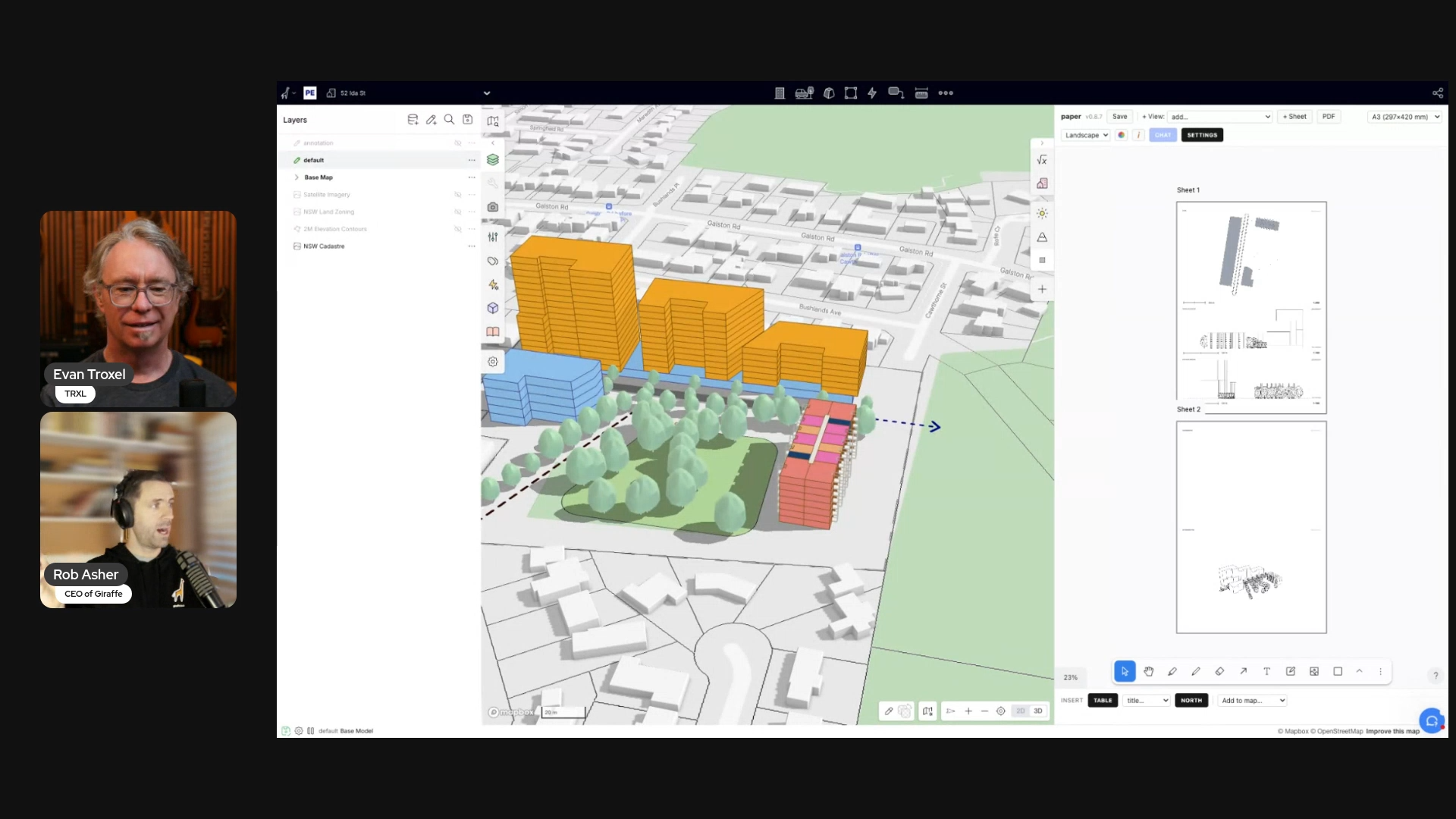
This was the second TRXL Feature Spotlight. No slides, no pitch deck — just Rob Asher sharing his screen and walking me through Giraffe, the platform he built for architects, designers, and real estate developers. We covered two things: Core, which is the foundation of everything Giraffe does, and Paper, a presentation app Rob built on Giraffe's own app store.
Watch the Replay
My Takeaways
I've been watching Giraffe for a while. Rob has been on the podcast before. I wanted to see it live, in real time, with actual geometry on an actual site.
Here's what we covered.
Core: The Map
The first thing to understand about Giraffe is that it's map-first. Not model-first.
Most architectural software starts with a blank document. You open a file, draw something, and then spend hours pulling in site context — adjacent building models, GIS data, zoning layers, parcel boundaries — through workflows that produce data that's dumb once it gets in. Rob and I spent years doing exactly this in Rhino and Grasshopper. Getting the map into the model was a whole project.
Giraffe inverts this. You put your design information into the map. You're never operating on a little square. You're always on the whole planet.
The data layer system pulls directly from ESRI map servers and GIS infrastructure around the world. Rob demonstrated adding New South Wales land zoning and parcel data, but the system works anywhere with a government-hosted geo server. Right-clicking any geometry queries the database for its metadata: zoning classification, road type, when the record was created, whatever the source provides. It's rich data, connected and current, not imported once and frozen.
Rob made the point that most people involved in a project (except architects) think map-first. Assessors think map-first. Clients think map-first. Architects are unusual in that we think model-first. Giraffe is designed to close that gap.
Core: The Pencil and Calculator
Once you have the site, you draw on it.
The pencil borrows from Rhino and SketchUp. Shortcuts are built in: Shift D for dimension strings, Shift G for push-pull. Layers work the way you'd expect — folders, locking, transparency, active layer designation. Arrow and annotation types let you communicate design intent, not just geometry.
Watching Rob sketch a master plan layout over a live site brought back something I've felt in every early-stage project: the most useful thing you can do in a client meeting is draw. Not just because it's fast, but because drawing in front of someone produces information. "There's a stinky drain down there." "There's a telephone easement that's not on any plan." The sketch is an information vacuum. Giraffe makes that sketch live, on the map, with geometry that carries meaning.
The calculator is where it gets interesting. Before designing anything, you set up assumptions: efficiency ratios, rent, construction time, dwelling sizes, floor-to-floor heights, facade costs. Rob described this as getting the client to write down the numbers they already have in their heads. Then you assign a usage to a geometry object — residential, retail, whatever — and Giraffe starts calculating. Dwellings, paved area, facade area, open space: all live, all connected to the geometry.
The analytics layer takes it further. You can build custom formulas that pull from the model: hard cost = area from model times cost rate from assumptions. If you want to see what doubling the cost does, type *2. It's a pivot table that lives inside the design environment, connected to the geometry driving it.
Everything runs on the platform. Nothing lives on anyone's C drive. Rob demoed a project for over 25 minutes and at no point was he exporting, sharing files, or managing links. That's the point.
Paper: A Presentation Layer Built Inside Giraffe
The second feature was Paper, and this one has a different backstory.
Paper is not part of Giraffe's core code. Rob built it himself as a Giraffe app — roughly 40 hours of development working with Claude, now at version 0.8.7 with around 100 versions in. It runs on Giraffe's app store, which supports third-party and firm-built applications alongside the platform's own tools.
Paper is an infinite canvas. You add frames to it. Each frame is a live viewport of the Giraffe model: a plan, an axonometric, or an elevation. Same concept as Paper Space in AutoCAD or layouts in Rhino — double-click into a frame and you're navigating the model. Controls for cut height, line widths, layer visibility, and color overrides are all there. Elevations auto-populate with relative levels based on every unique level in the project.
The AI integration uses a BYO API key. You bring your own Gemini or Claude token. Organizations can deploy a token centrally and monitor usage. Rob showed preset prompts rendered against the model image: collage style, pen and ink, watercolor, perspective. Freehand sketch overlays you draw on the canvas are part of the prompt to maintain the diagrammatic quality, or you can add a custom prompt to direct it further.
The feature that surprised me most was the area table. You type a plain-language request: "Summarize gross and net areas by usage in a table." Giraffe calls the API, which writes code that queries the model and returns the table alongside the formula that built it. You can read the formula and verify it isn't making things up, then insert the table directly into your Paper canvas.
The pitch: go from site context to massing to feasibility to a client-ready presentation without leaving the platform. When Rob had a north arrow, plans cut at two levels, AI-styled imagery, and an area table all on one canvas, I thought about how long that same output would take in the usual pipeline. View capture, file management, link management, re-export every time something changes. In Giraffe, it's just live.
Bonus features: Squeeze and Building Skin
We had a few extra minutes, so Rob showed Squeeze — another app he wrote with about 30 hours of development. Rob was (and still is) a Grasshopper wizard, so your mileage may vary. The point is that this kind of thing is included in the platform so you don't have to reinvent the wheel from scratch.
Most apartment layout algorithms pack rectangles along a corridor. Australian residential tends toward more sculptural floor plates, so Rob built the inverse: give it an irregular polygon, and it squeezes apartments into it. Once the layout bakes to a layer, a separate app called Building Skin applies a facade system to the output.
Two knowledge modules, sequenced together. The apartment layout logic is one app. The facade system is another. Neither needs to know what the other is doing. Giraffe sits between them as the lightweight interface.
Rob said it well: the human does the gesture, the algorithm does the predictable technical work downstream. That's the right abstraction level. The lighter the driver geometry, the faster every design change moves. The moment a model gets too heavy, change is painful. Giraffe is built around that constraint from the start.
Practical Notes
- Pricing: Core platform is $45/month. Teams/enterprise is around $1,500 USD per user per year.
- Learning curve: Rob estimated a few hours to get comfortable with the core concepts. Familiarity with SketchUp and InDesign helps.
- AI approach: BYO API key (Gemini or Claude). No proprietary model. Organization-level token deployment available.
- Open platform: No proprietary data format. Connect your own GIS server. Open to external fine-tuned AI models.
- Collaboration: Platform-based. Projects live in Giraffe and are shareable from day one. Nothing local.
Where to See It
Head to giraffe.build to explore the platform and sign up.
Thanks to Rob Asher for a genuinely useful demo. This is exactly what the Feature Spotlight format is built for.
22 June 2026, 1:00 pm - 232: 'Bringing Joy Back to Architecture', with Tatjana Dzambazova
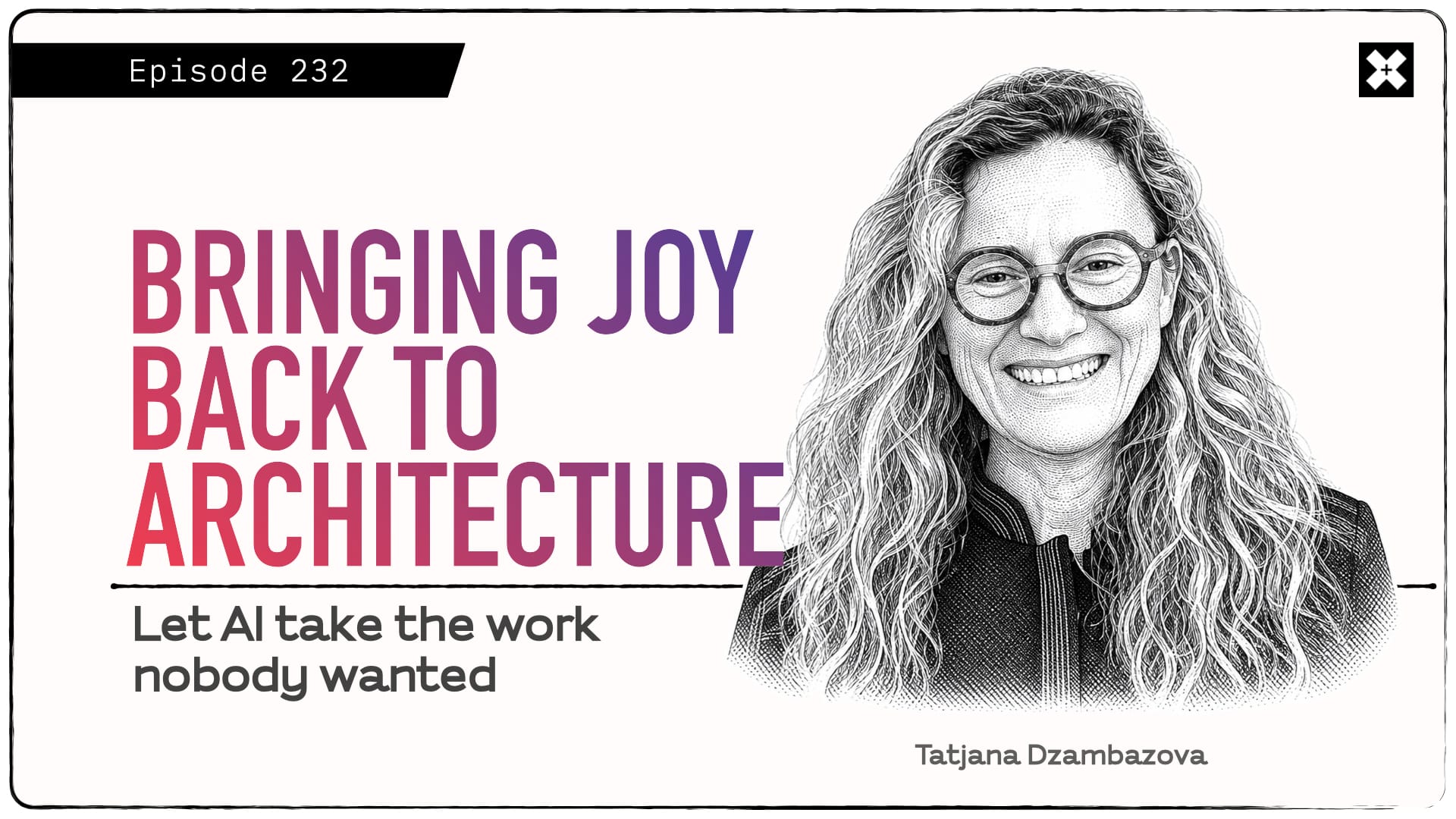
Tatjana Dzambazova joins the podcast to talk about why the AEC industry deserves a brand new tool, one built for AI from the ground up instead of bolted onto software designed 25 years ago. We explore the end of what she calls the terror of technological expertise, the difference between hoarding artifacts and capturing the process behind a building, and why she believes AI could bring joy back to architecture rather than grinding it down to cost and speed.
This episode is especially relevant for architects and firm leaders who feel the pull between efficiency and meaning, and who are wrestling with what their value will be in a world where anyone can generate a rendering. Tanja makes the case that if architects don't define what they'll be paid for in the future, owners will define it for them, and she offers a far more hopeful read of this moment than most.
Original episode page: https://trxl.co/232
Listen wherever you get your podcasts.Watch This Episode on YouTube:
Subscribe to the podcast on YouTubeEpisode Links:
Some links on this page help fund our work, and we may earn a commission from purchases at no extra cost to you.
Connect with the Guest
- Tatjana Dzambazova (Tanja)
- TEDxSonomaCounty: The Future of Our Past — Her talk on using technology to archive and protect cultural and natural heritage.
Motif and the New AEC Tool
- Motif — Motif where Tanja leads AI strategy. Team of ex-Autodesk founders. TechCrunch on the $46M raise.
Where Tanja Built Her Career
- Autodesk — Where her technology career started, across a dozen-plus products.
- Autodesk Revit — The product she helped scale as its first PM.
- Autodesk ReCap — The photogrammetry tool that grew out of the Memento project she led.
- Instructables — The acquisition she brokered, part of the shift to a "design and make" company.
- Velo3D — Metal 3D-printing software now used by SpaceX.
- Bright Machines — Robotic automation of final assembly.
- IDEO — The design consultancy where she led emerging-tech work before Motif.
Tools, Software, and Concepts Mentioned
- SketchUp — The approachable tool that won people over despite its limits.
- Grasshopper and Dynamo — Powerful tools that still demand expert users.
- World Labs — Fei-Fei Li's spatial-intelligence startup, evidence of how fast capture is moving.
- Claude — The AI she talks to constantly; her thinking-partner example.
- Second Life — The virtual world she recommended Autodesk stay away from.
- Photogrammetry (Wikipedia) — The technique behind ReCap and her conservation work.
- Nano Banana Pro, Google's Gemini image model, referenced as AI rendering that frustrates senior architects who don't know how to prompt.
People and Collaborators
- Carl Bass (Wikipedia) — Former Autodesk CEO who handed her open-ended mandates.
- Iris van Herpen — Fashion designer and friend she collaborated with on capturing handmade dresses.
- Louise Leakey (TED) — Paleontologist whose fossil skulls Tanja helped digitize.
- Otherlab — Saul Griffith's lab; collaborator on the first digital fabrication tools (123D Make, now Slicer for Fusion) that, alongside the Instructables acquisition, kicked off Autodesk's shift from a "design" to a "design and make" company.
- AEC Magazine — Martyn Day, who she gave one of the first major Revit interviews to.
Books and Ideas
- An Immense World — Ed Yong (Amazon) — The book on animal senses she cites (she called it "Invisible Worlds").
- Ovid's Metamorphoses (Wikipedia) — Source for her "five AI deities" framing.
- The Five AI Deities — Her framework: Prometheus (creating what never existed), Hermes (multimodal translation), Augur (judgment), Mnemosyne (memory and personalization), and Zeus (orchestration).
Places and Cultural References
- Marin County Civic Center (Wikipedia) — Frank Lloyd Wright's last major work, her example of what architecture is for.
- Gattaca (Wikipedia) — The film that features the Civic Center.
- Diocletian's Palace (Wikipedia) — Subject of the student seminar where she landed offers from Botta, Hertzberger, and others.
- Conservation X Labs — The org she volunteers with on tech for conservation.
- Smithsonian 3D — The digitization program she helped build tooling for.
- Cintoo — Dominique Pouliquen's reality-capture company; his earlier startup was acquired by Autodesk.
About Tatjana Dzambazova:
Tatjana Dzambazova (Tanja) leads AI strategy at Motif, the AEC software startup founded by a crew of ex-Autodesk veterans who think the industry deserves a brand new design tool, built for AI from the ground up. Trained as an architect in the former Yugoslavia, she spent more than a decade drafting in Vienna and London before Autodesk hired her on the spot, largely on the strength of six languages and a working knowledge of CAD. What followed was one of the most circuitous careers in AEC tech: starting in product support, then becoming Autodesk's first product manager for Revit during the make-or-break years that turned it into the global standard, co-writing the first three books on the software, founding the consumer group and its 123D digital fabrication line, and brokering the Instructables acquisition that shifted Autodesk from a design company to a "design and make" company. She went on to work on photogrammetry (Memento, now ReCap Photo), the AI Lab, and stints at Velo3D, Bright Machines, and IDEO, collaborating along the way with the Smithsonian, paleontologist Dr. Louise Leakey, and fashion designer Iris van Herpen. A self-described generalist and "technology whisperer," she's spent her whole career translating scary new technology into something people actually want to use.
Provide feedback for this episodeConnect with Evan
Episode Transcript:
16 June 2026, 1:00 pm - Tatjana Dzambazova (Tanja)
- Architects Didn't Lose Control of CA. They Defaulted It.
When something goes wrong on site and the record of what actually happened lives in your email and a spreadsheet, whose story gets believed?
💡Who this episode is for: Especially relevant if you run or participate in construction administration at your firm, carry the liability for it, and suspect you've quietly handed control of that phase to someone else's software.Summary
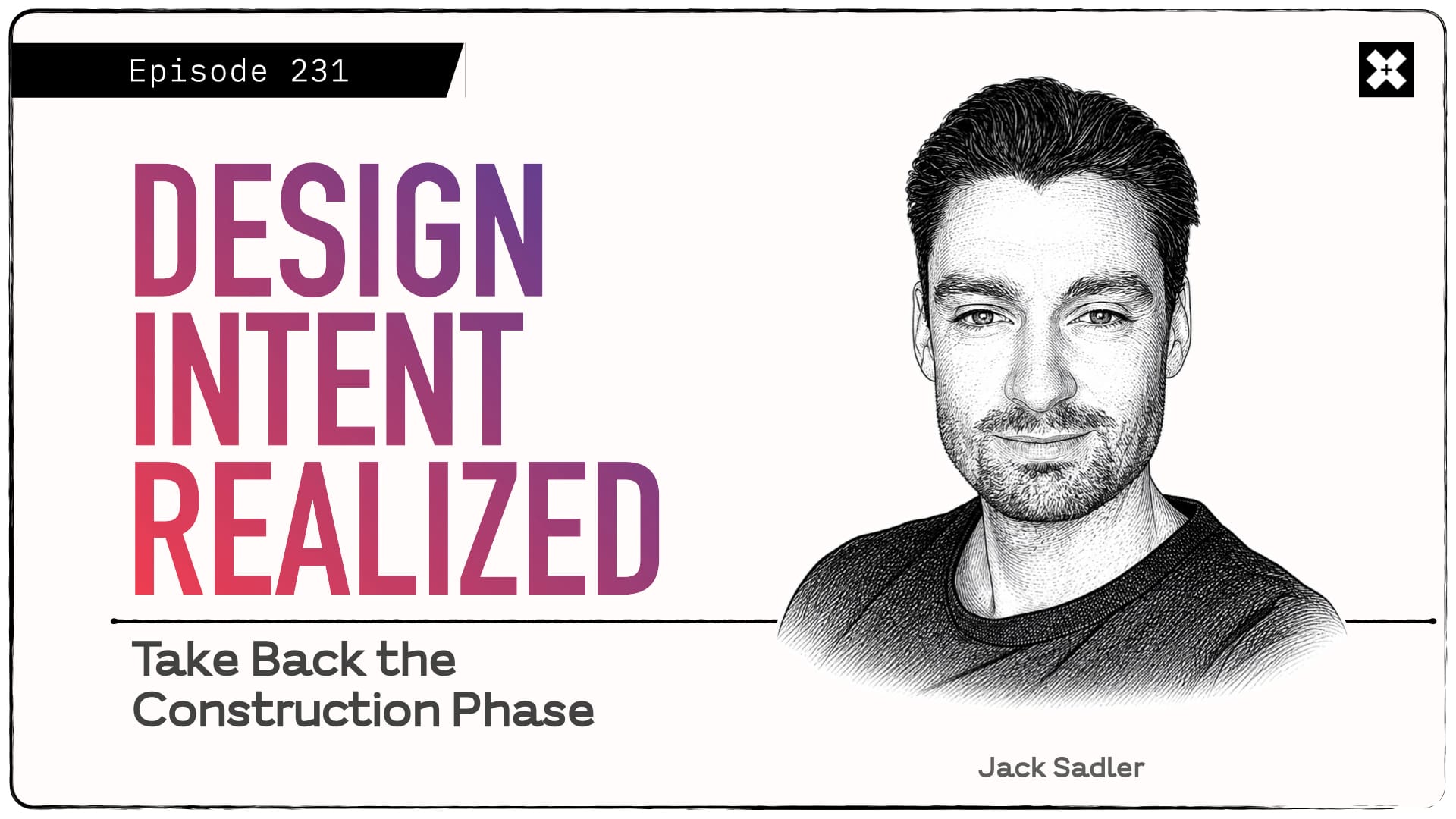
Construction administration is the phase where a project either gets built the way it was designed or it doesn't. That's the stakes Jack Sadler, co-founder and CEO of Part3, put on the table in our conversation in TRXL 231. Jack is the first to tell you he's not an architect. His background is vertical SaaS and custom software, and Part3 came out of watching his wife go from a contractor's fully-tooled environment to running an architecture firm's CA out of spreadsheets and email. He saw the gap up close and built for the side of the table that usually gets ignored.
We talked about why CA became a cost center instead of a profit center, why architects keep finding themselves working inside the contractor's tools and the contractor's version of events, and how AI can take the administrative grind off senior people without touching professional judgment. Jack's reframing of the issue: architects haven't lost control of CA because they wanted to give it up. They lost it by default, by letting decisions about tools and workflows get made without them.
This isn't another AI hype conversation. It's a grounded look at the seemingly least-loved phase of practice, the one where your most expensive people do your least valuable work (read: email and spreadsheets, not the actual construction process), and a real argument for why now is the moment to take it back.
Catch the full episodeWhat's Inside
- Accepting the defaults. Why architects keep ending up inside the contractor's software, and what it costs them when a project goes sideways.
- The cost center problem. CA generates revenue and still loses money, and the reason has nothing to do with how hard people work.
- Controlled transparency. Why Jack abandoned his original belief that everything should be visible to everyone, and what he replaced it with.
- Automate the admin, not the judgment. Where the line sits between what AI should handle in CA and what it should never touch.
- The conductor problem. What happens to the junior architect learning CA when the baseline gets handed to them, and whether that's a gain or a loss.
Click here for the link to the live stream (and recording) and get a calendar invite.Episode Analysis
Whose Software, Whose Story
The contractor's side of CA has no shortage of tools. Procore, Autodesk, e-Builder, Trimble, Aconex, every size and shape. The architect's side has traditionally been spreadsheets and email. So when CA lands on the design team, they just move into the contractor's environment by default, and Jack's point is that the default carries hidden freight.
"We've accidentally let the contractor not only decide the software, but we've let them decide how the workflows are gonna run, what the team responsibilities are gonna be, what the rules and the data tells us about how the project went. Everything is told from one perspective."
That's fine when everything goes well. The trouble shows up when it doesn't, and your version of events lives somewhere undiscoverable.
"Letting the contractor control the story, the narrative, the data, the workflows, if something does go wrong, it makes it very difficult to tell your story, tell your side of events when yours lives in spreadsheets and email and is not discoverable and not easy to track."
The liability research backs this up. The common thread in most CA-related claims against architects isn't bad design. It's inadequate documentation, the inability to prove when a submittal was reviewed, who approved it, and how a discrepancy was handled.
📊Part3's own breakdown of this puts numbers to the problem: the profit killer in CA hides in email threads, scattered spreadsheets, and administrative hours that never make it onto a timesheet, and the scariest cost isn't lost billables, it's liability exposure from inadequate documentation. Industry fee guides generally put CA at roughly 20 percent of total architectural fees, which is a lot of fee to run on a (dare I say) janky process.Why the Most Expensive People Do the Least Valuable Work
Jack had two quotes from architects that frame the business problem better than any pitch deck could. One principal told him the whole goal in CA is to not lose all the money you made in design. And he described what a full day of CA actually looks like:
"They'll go from being an architect in the morning to a project manager to an accountant to a lawyer, to a psychiatrist managing the team, and then all the way back to an architect again in the same day."
Here's the mechanism that makes CA a cost center: Firms staff it with senior people because the phase genuinely needs professional judgment. Then those expensive people spend their hours chasing consultants, logging documents, and uploading files into someone else's system. The judgment is worth a lot. The data entry is not. The bill goes out at the same rate for both.
"If we can enable that one really senior person on a project to run three projects or four projects instead of the one, then it's no longer a cost center."
That's the whole argument compressed into a sentence. Not replace the person. Multiply them.
Controlled Transparency, and the Line AI Shouldn't Cross
One of the more honest moments was Jack admitting he got something wrong early. Part3 launched on the belief that raw transparency was best for the industry, that everything should be visible to everyone. Customers talked him out of it, one request at a time.
The reason is something every architect understands in their bones. Nobody wants to work in public while the thinking is still in flight. An architect doesn't want the contractor seeing an approval before the structural engineer has weighed in. So in fully transparent tools, they pull the work back out into email to do it privately, and the "automated" workflow turns into theater. Part3's answer is to let you work transparently with your consultants, then share with the contractor and client when you decide it's ready.
"During the project, it's controlled transparency."
The same instinct shapes how Jack talks about AI, and this is where the conversation earns its keep. AI in CA should categorize, name, route, scan submittals for missing data, and remind you where you left off. It should not make the call.
"AI is the best way to automate administration. It should not automate professional judgment, but that's the whole point. It should be automating the pieces."
He's also clear-eyed about the risk. Left unattended, AI pulls everyone toward the average.
"By nature, what AI will do is help you default to the average that exists out there. If you're a great writer, you should probably aspire to do a little bit better. The same thing will happen in architecture."
The fix isn't to avoid the tools. It's to use them to reach the baseline in minutes so you have the time to go beyond it. That reframes the architect's role from doing to conducting, deploying agents like interns that gather and flag while you keep the judgment. And it lands on the real enemy of good CA: context switching. Jack uses a 10 percent tax per task, the difference between being fully focused on one thing and 45 percent focused on two. An assistant that can tell you "here's where we left off, here's what we got stuck on" gives those points back.
"I think of CA as the phase where design intent is realized or negotiated away. And too often, the negotiation's happening and you're not at the table."
— Jack Sadler, co-founder and CEO of Part3Connect the Dots
This conversation builds on ideas explored in previous episodes:
- TRXL 219: 'Keeping Architects in the Driver's Seat' — George Guida and I covered the same core tension Jack names, architects holding onto authorship and control instead of ceding it to downstream tools and decisions, from the design technology angle.
- TRXL 222: 'You're Automating the Wrong Thing' — Mirco Bianchini's argument pairs directly with Jack's line that AI should automate administration and never professional judgment, a useful gut-check before you point automation at the wrong part of your practice.
Conclusion
The thread running through this whole conversation is ownership. Not more responsibility, not more hours, just taking deliberate control of the phase you're already on the hook for: the flow of information, the source of truth for every decision, the workflow of your consultant team. CA doesn't have to be the place where firms bleed margin and lose their version of events. With the administrative weight automated and the judgment kept human, it can become the thing you point to in an interview, the proof that you don't just design well, you execute when something goes wrong.
What I Didn't Say on the Show
The reason CA gets dumped on the junior person isn't really about cost, it's about how little we've valued the phase. We treat it as dues to be paid rather than a place where real expertise gets built. Jack's automation argument “threatens” that whole tradition, and I'm not sure the industry has thought through what it means. If a 24-year-old gets the code baseline and the submittal gaps handed to them in minutes, they skip the years of figuring it out the hard way. That's a real gain in speed and a real risk to how judgment gets formed. I don't think Jack has the full answer, and neither do I. But it's the question underneath the whole CA conversation, and we're going to have to teach our way through it, not automate our way around it.
My Question for You
If you had to defend your firm's last difficult project in front of a lawyer tomorrow, could you produce a clean, time-stamped record of every decision and why it was made, or would you be reconstructing it from your team’s inboxes and from mis-filed files strewn across who knows how many folders on various file sharing platforms?
Practical Recommendation
Before you evaluate a single tool, run Jack's diagnostic on your own firm. Pick one active project in CA and answer three questions honestly: Do you control where information lives, or does it live in the contractor's system? Can you tell the story of when each submittal and RFI was reviewed and why? Do you dictate how your sub-consultants work with you, or are you adapting to everyone else's process? Wherever the answer is no, that's a gap you've defaulted on, not one you chose. Write those gaps down. That short list, not a software demo, is the actual starting point for taking CA back, and it tells you exactly what any tool you eventually pick has to solve.
Do these ideas spark your interest or make you want to dive deeper? Click the button below to listen to the full episode and read the show notes to get all the insights and details.
Catch the full episode13 June 2026, 1:00 pm - Live Wednesday: Giraffe's Core platform + new Paper space

I'm hosting another Feature Spotlight live demo next week. This time I'm sitting down with Rob Asher from Giraffe at 2pm PST / 5pm EST on Wednesday the 17th. We're walking through two features that define how the platform works:
Core
Giraffe puts a map, a pencil, and a calculator in one place. Site context, massing, and feasibility all in a single structured environment. No switching between tools, no disconnected exports. Everything connected from the first sketch.
Paper
Giraffe recently added a paper space for building simple presentations directly inside the platform. Take your site analysis and feasibility work and turn it into a client-ready document without leaving the workflow.
This is a hands-on demo. We'll dig into what the platform actually does for architects and real estate developers working through early-stage design and feasibility.
📅 Wednesday, June 17 · 2:00 PM PST / 5:00 PM EST
Register to get it on your calendarSee you Wednesday.
— Evan
12 June 2026, 1:00 pm - New on TRXL: Feature Spotlight Livestream
There's something new happening here at TRXL HQ. I want to continue building on the authentic conversations the TRXL podcast is known for, but also give tech companies and the people behind them the ability to do some show and tell that the long-form episodes just aren't built for.
Ideally all of us should be able to have a window into the highest impact and best offerings in our industry that have the potential to move the needle of practice. But we don't have a lot of time, and we need something that works well for us visual people. So here's what's happening: I'm announcing what I call Feature Spotlight.
If you're not a TRXL member, click the button to get notified when upcoming Feature Spotlights are happening.
Sign up to get notifiedEvery month or so, I'm bringing a builder from the AEC tech world onto a livestream to show off a couple of features that are actually worth your attention. No slides. No scripted walkthroughs. They open the software, share their screen, and demo it live — with all the pressure and unpredictability that comes with that.
Each episode covers two features and streams live on YouTube free for anyone to watch.
One guest. Two of their best features.
No slides. No scripted pitch.
Just a live demo and a real conversation.How it works
Show up live
Sign up for free and I'll send you a calendar invitation with a link to the live stream and an email reminder before each episode so you don't miss it.
Episodes are streamed live on YouTube. Watch the short demo of their best new features, hear the story behind them, and find out what's coming next.
What to expect
I host, the guest drives the demo. Things might break, and that's part of the fun. Each Feature Spotlight runs about 40 minutes.
Feature Spotlights will typically go live on Wednesdays at 9 AM Pacific / 12 PM Eastern / 5 PM London. Check your inbox for exact dates and times.
Join us!See you on the stream.
— Evan
11 June 2026, 6:49 pm - Inside D5 Render's New Cesium Integration and AI Material Generator
I started a new format on TRXL called the Feature Spotlight. The idea is simple: live, hands-on, no slides, no pitch. Just a real look at what a tool actually does, driven by someone who knows it inside and out.
Watch the Replay
My Takeaways
For the first one, I sat down with Jeff Espinoza from D5 Render to walk through two new features I'd been wanting to see in action: the Cesium integration and the AI material generator. Both of them solve problems I spent years fighting with back when I was building models and rendering for clients.
Here's what stood out.
Cesium: real-world site context, streamed in
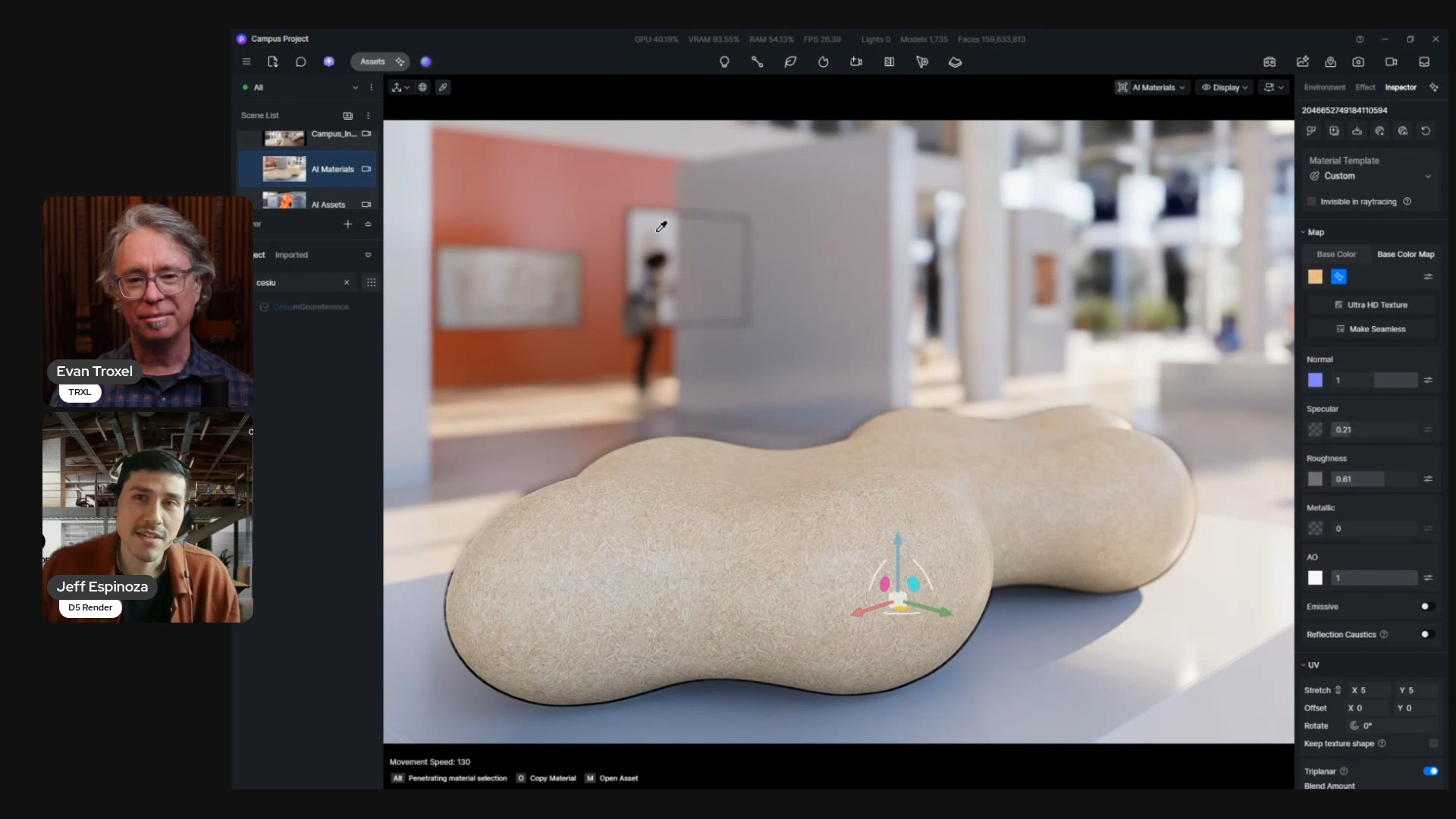
The setup is familiar to anyone who's rendered a building. You connect your model to D5 (Jeff used a Revit model of a tower) and at first it's just your geometry floating in space. Traditionally, that's where the slog begins. You either build the surrounding site context by hand, by some really complicated Grasshopper workflow, or if you're really high tech you go fly a drone over the actual site to capture it.
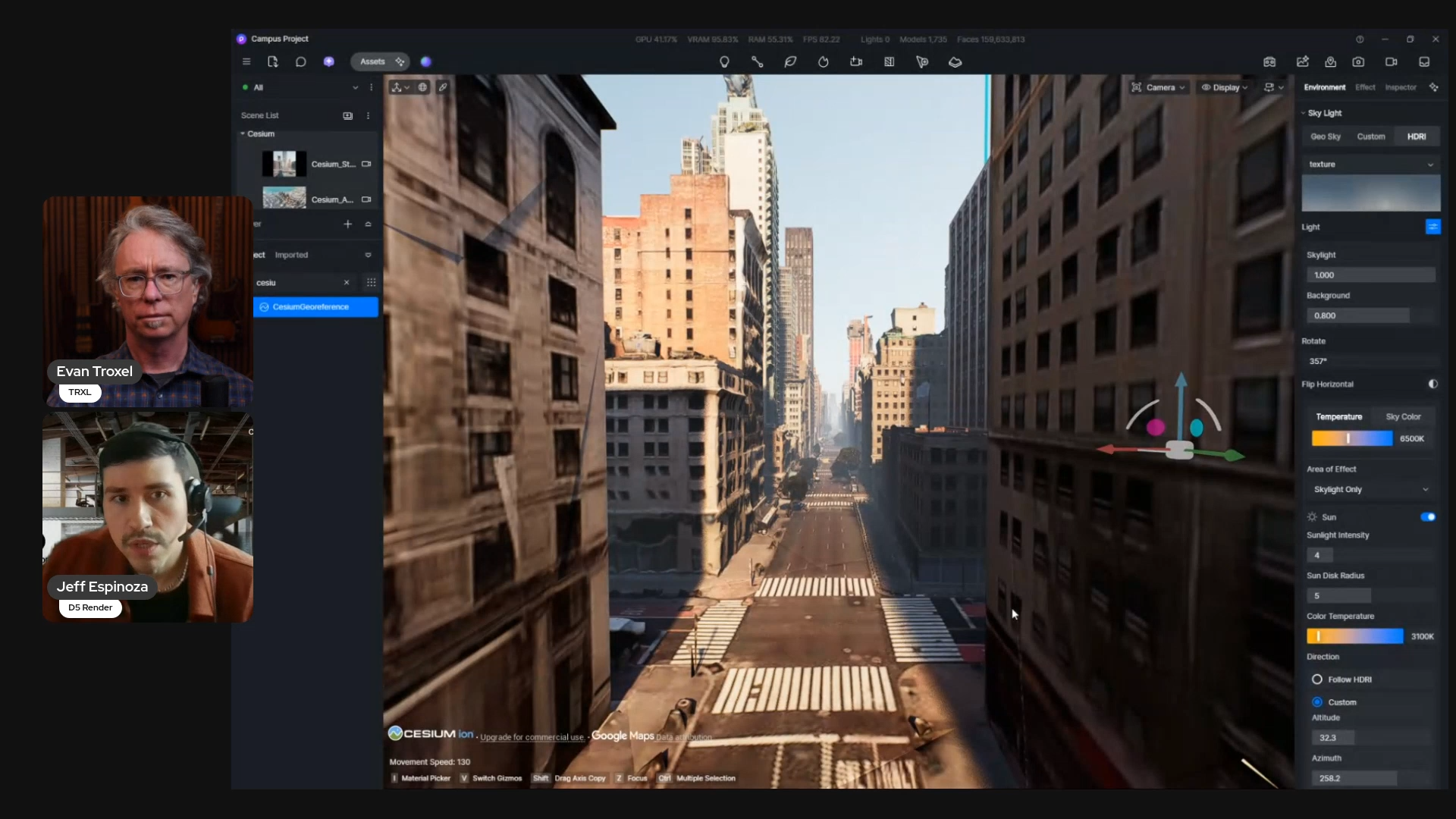
To start with the Cesium integration, you just type in an address. D5 taps into Google Earth and streams the surrounding context straight into your scene — terrain, buildings, textures, all of it. Jeff pulled in downtown Chicago, then later dropped the same model into Midtown Manhattan by typing in "Empire State Building." No performance hit, no stuttering, even with huge datasets.
The word that matters here is streamed. None of that data lives on your machine. There are other workarounds to get Google Earth data into a model, but they all mean downloading heavy 3D files and bloating your project. D5 streams it live, which keeps everything lightweight, with the tradeoff that you need to be online while you work.
The detail I loved most was what amounts to a reverse section box. A void box. If the streamed-in context overlaps your proposed design — say you're a landscape designer replacing a park that already exists in the Google data — you carve out that section and drop your own model into the gap. You keep the real surroundings and lose the conflict.
And because it's all inside D5, you keep every post-processing feature: animated birds, clouds, lighting adjustments, accurate sun path studies for the actual site location. When you zoom down to street level you'll see the limits of a Google Earth import, but that's exactly where D5's AI style transfer steps in — a beauty pass that cleans up textures and lighting with a side-by-side comparison so you can see what changed instead of just trusting the software.
That comparison view took me right back to my own work. I made the call before every client meeting about how far to dial the rendering back, because clients get hung up on details. Soft look, shadows on, textures off — whatever kept the conversation on massing instead of a doorknob. Being able to apply a style transfer across multiple images for consistency, at any design phase, without committing too early? I would have killed for that.
AI material generator: the death of the seamless-texture grind
D5 splits its AI into two buckets: AI for production and AI for post-production. The material tools are for production — the stuff you're doing when you're in the thick of generating renderings. The style transfers and detail upscaling are post-production.
Start with a texture that has visible seams. One click on "make seamless" and the AI does it's magic to the edges and turns it into a usable material. Low-res image you found online? Upscale it. Then generate the missing channels (bump, reflections, shadow information) so a flat image picks up real material depth. Switch to clay mode and the material information is still there even with the base image removed. Every value stays editable afterward.
I laughed out loud at this part, because I remember exactly how painful seamless textures used to be. The round-trips to Photoshop, the offset filter, painting out the seams by hand, thing after thing after thing. What this really unlocks isn't just speed... it's the ability to play and experiment without being an expert Photoshop user babysitting file paths and mastering navigating the apps. It puts some joy back in the process.
Then Jeff showed AI Material Snap, which genuinely surprised me. Upload a material palette — or photos from the web or even a site visit — and D5 detects the individual materials in a flat 2D image. You select one, hit generate, and it builds a seamless, ultra-HD texture with all the channels. No hunting down the manufacturer's SKU, no checking resolution before you import.
Here's where my brain went: I can now collect images of textures I like — from photographs, not just texture libraries — and pull the material straight out of them, with the bump, reflection, and normal maps generated for me. It's like building a mood board you can actually render from. And because the AI handles it, you don't have to wait for an overcast day to avoid hard shadows in your captures. That constraint just disappears.
I mentioned during the demo that real-time rendering moves "rendering" from the end of the process into the middle of it. Rendering used to be the thing that showed up at a milestone. Now the iterating happens live, materials and all, and it becomes part of the design feedback loop. How do the materials feel? How does the space feel? You're answering those questions while you design, not after.
A few things worth knowing
A couple of practical notes came up that are worth repeating:
- AI you can steer. Most AI rendering is a black box — you write a prompt, you get a result, you're not sure what happened. D5's approach uses AI for material creation, scene lighting, and assets, but every result stays tweakable afterward with your own artistic eye. It's a nice balance of manual controls and automation.
- Your data stays yours. D5 doesn't use your inputs to train its AI models. For firms doing their due diligence on data security and authorship, that's a real consideration.
- Hardware is reasonable. It's ray-tracing-dependent, so it leans on your GPU and VRAM, but an NVIDIA 3060 (a card that's more than five years years old now) gives a comfortable balance of cost and performance. AMD cards are supported too.
- Real path tracing is there. Beyond the default ray tracing, you can enable custom path-tracing settings for final renders, plus export traditional channels (material ID, object ID, etc) for Photoshop — and a dedicated AI post channel that powers in-scene inpainting. Jeff added water and trees to a finished park render right in the image, no trip back to the 3D model required.
Where to see it
If you want to get your hands on the Cesium integration and the AI material generator yourself, head to d5render.com. There's a community version you can download and play with.
If you'll be at the AIA Conference on Architecture in San Diego, June 10–13, D5 has a booth and Jeff will be running demos in person. They've also got D5 Render 3.1 shipping by the end of the month, along with D5 Lite — a plugin that lives inside Revit and Rhino with a live preview mode and built-in AI prompting for early conceptual design, so you can test ideas before committing them to your model.
Big thanks to Jeff for taking the time to show this off. This was exactly the kind of behind-the-scenes look I wanted to kick the Feature Spotlight off with.
8 June 2026, 4:00 pm - 231: 'Architects: Reclaim Control in CA', with Jack Sadler
In this special partner episode, Jack Sadler joins the podcast to talk about the phase of a project where architects quietly lose control: construction administration. We explore why CA became a cost center instead of a profit center, what happens when architects run their work out of someone else's software, and how AI can automate the routing, logging, and paperwork without ever touching the professional judgment that actually matters. Jack makes the case that CA is where design intent gets realized or negotiated away, and that owning the flow of information is how you make sure it's the former.
This episode is especially relevant for firm leaders, project architects, and anyone who's been handed the CA phase and felt it turn into email triage, spreadsheet chasing, and cover-your-ass paperwork. If you've ever suspected there's a better way to run construction administration, one that makes your firm smarter, more defensible, and maybe even profitable, this conversation will give you a concrete place to start: take back control of what you're already accountable for.
Original episode page: https://trxl.co/231
Listen wherever you get your podcasts.Watch This Episode on YouTube:
Subscribe to the podcast on YouTubeConnect with the Guest
- Jack Sadler — co-founder and CEO of Part3
- Part3 — the construction administration platform built specifically for architects and design teams that anchors this entire conversation.
- Part3 on LinkedIn
People and Firms Mentioned
- Robert Yuen — co-founder and CEO of Monograph
- Monograph
- Why it's relevant: Jack points to Monograph as an example of the "back a team that listens" dynamic, where firms adopt a tool, build a relationship, and nudge it forward over time.
- Christopher Parsons — founder and CEO of Knowledge Architecture
- Knowledge Architecture
- Why it's relevant: Named alongside Robert Yuen as an AEC entrepreneur who has been on TRXL; part of Jack's point about backing a team's roadmap, not just a feature set.
- Evelyn Lee — Founder of Practice of Architecture, 2025 AIA National President
- Practice of Architecture
- Why it's relevant: Jack references Evelyn's past TRXL appearance on the coming shift in how architecture firms price and demonstrate value, tied to making CA profitable.
Previous TRXL Episodes Mentioned
- 086: 'Here to Do the Hard Thing', with Robert Yuen
- trxl.co/086
- Why it's relevant: Jack cites Robert Yuen as a prior guest when discussing the loyalty firms develop toward software teams that listen and iterate.
- 113: 'Surprises Are Not Good', with Robert Yuen
- trxl.co/113
- Why it's relevant: Yuen's follow-up TRXL conversation on transparency and the business of architecture, echoing Jack's "controlled transparency" point.
- 190: 'AI + KM = Smarter AEC Firms', with Christopher Parsons
- trxl.co/190
- Why it's relevant: Parsons on knowledge management and AI in AEC firms, the same "organize your data first so AI can use it" thread Jack pulls on here.
- 055: 'Crossing the Streams', with Je'Nen Chastain and Evelyn Lee
- trxl.co/055
- Why it's relevant: Evelyn Lee's TRXL conversation touching on the business and pricing models for architecture practice that Jack invokes when predicting a value-based pricing shift.
Concepts Worth a Reference
- Construction Administration (CA)
- AIA: The Architect's Role
- Why it's relevant: The entire episode lives in this project phase, where, as Jack puts it, design intent gets "realized or negotiated away."
- Submittals and RFIs
- Construction submittals overview
- Why it's relevant: The reactive, deadline-driven workflows Jack uses as his primary examples of where AI can flag gaps and route work without overriding professional judgment.
About Jack Sadler:
Jack Sadler is the co-founder and CEO of Part3, a construction administration platform built specifically for architects and design teams. He's not an architect, and he'll tell you so up front. His background is in technology, with years spent in vertical SaaS across healthcare, finance, and travel, and a long stretch doing custom software, the kind of zero-to-one work where you get dropped into a new business model and build something from scratch. Before Part3 he held product leadership roles at companies like Rangle.io and CrowdRiff.
The construction angle came from home. His wife went to school for architectural science and spent six or seven years on site for a general contractor before moving to an architecture firm, where she went from a world of purpose-built tools to running everything out of spreadsheets and email. That gap became the company. Part3 is a bet most investors told Jack not to make, that you can't build a business serving architects, and a bet he's glad he ignored. That outsider's view of how design teams actually work during CA is exactly what makes him worth listening to here.
Provide feedback for this episodeConnect with Evan
Episode Transcript:
2 June 2026, 11:57 am - Jack Sadler — co-founder and CEO of Part3
- More Episodes? Get the App